Yearly wrap-ups, parcels, garlands… the summer is here, mate. If you found yourself on a chilly night (or hemisphere), read on to warm up as we take a look at another MyBB 1.9 milestone.
Fresh Out the Oven
Recent code on the development branch included the topping up of the new theme logic — with its Admin CP interface and front-end switches.
The majority of work on MyBB 1.9 focuses on how the file-based extension packages work, interact, and tie into the rest of the application. While managing themes, you’ll now find that every theme will be linked to a package found in the filesystem.
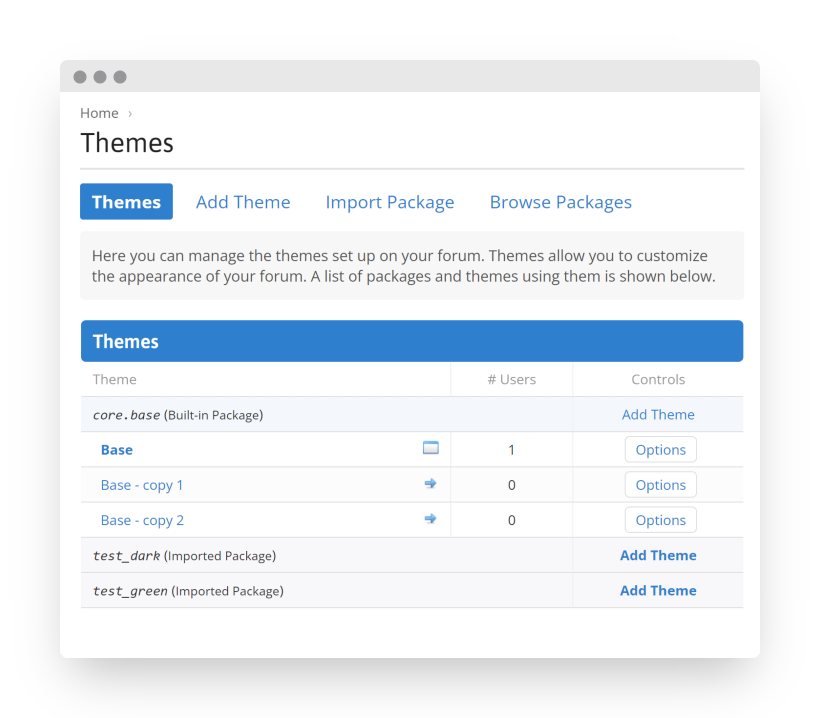
The individual, database-tied Themes will be the place to customize options defined by package authors.
You’ll still recognize most of the Admin CP styling section, as templates and stylesheets in the legacy format — inserted by plugins — will continue to be supported in the new series to ease the transition, while extensions are modernized.
Even though many authors prefer working in their favorite IDE, we want to bring a similar experience of creating and editing file packages to the Admin CP. We’re preparing to introduce an interface for Packages, where developers will find package-level tools — to prepare their themes and plugins for release — as well as a web editor for individual resources.
Another natural stepping stone up to MyBB 1.9 relates to how we all get there: the upgrade process.
 Using the new installer — with a CLI and a web UI that causes less mouse button wear — the upgrade has caught up with the rest of the application. The necessary adjustments for the theme system, new features, and internals are now checked and applied to carry over existing forums to MyBB 1.9 (and it worked on the first try, too).
This means you can grab the latest version and follow the familiar, improved procedure to upgrade a test copy of your MyBB 1.8-based forum. How does the 1.9 series suit it so far?
Between the headline changes, there are a number of miscellaneous improvements.
Moderators will see their toolset expanded with the ability suspend avatars and private messages. When handing out warnings, they can also require them to be acknowledged.
Users will enjoy the smooth curves of built-in smilies remastered in vector format (if you prefer to  with the force of all pixels, your old files will still be there). The general visual experience has also been brushed up around the deprecated post subjects, thread ratings, and a toggle to hide post icons globally.
And, to tell who’s who in the first place, a group legend for your forum community’s hierarchical needs.
A new theme and UI handling mean that we’ll continue applying visual, performance, and internal tweaks to the engine. An overview of source code languages — now including Twig and SCSS — helps convey the extent of changes to MyBB’s GUI (even larger when factoring in PHP controller code and theme logic). Code in those languages will be in focus, as we balance the cool hues of MyBB’s new default Base Theme.

As always, you’ll find the stream of changes in our repository.
Hot Reload
How do you keep an eye on the new branch? Most of our Community members prefer the simple build package, updated seconds after any change is committed to the repository. In our quest to improve quality of life, and to bridge users with code progress, we’ve made it easier to tell whether your local installation could use a refresh — to see the latest layer of tweaks.
 Now, when using:
- the automated package,
- a
.zipfrom GitHub, or - simply
git clone,
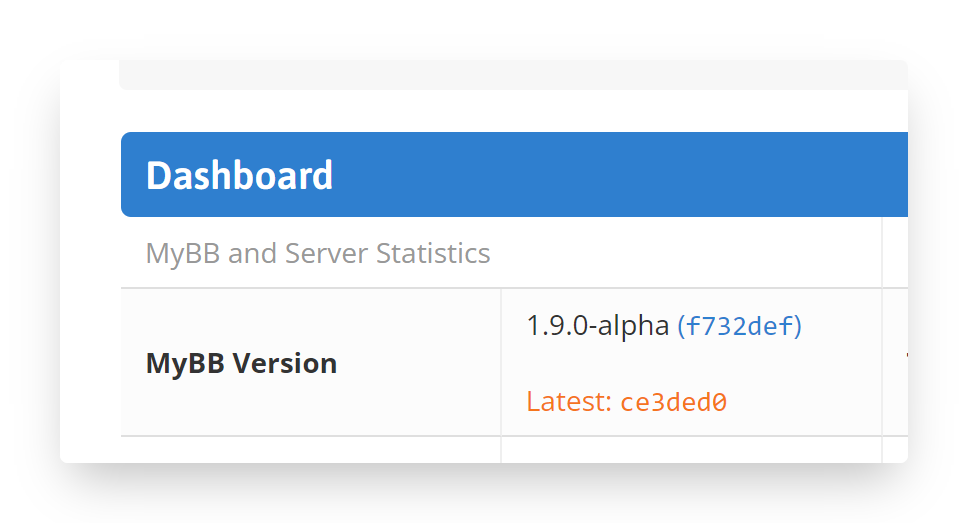
MyBB will show you the exact commit for the preview version you’re running — displayed on the Admin CP Dashboard.
Additionally, if further commits are made to the official development version — checked together with regular updates — the top commit will be shown below.
Take a glance at the Home page to see if any new changes made their way up since your download, to ensure that bug is still reproducible, or to simply live on the edge of dev-1.9.
We recommend pairing this with the &fast parameter during (re)installation. Which one of your setups has MyBB installing itself the fastest?
This shift in approach keeps code contributors in a closer loop, compared to individually tagged test releases along the development timeline.
To stay in the loop, the relevant discussions for the series — and later, its maintenance — can now be found in its own MyBB 1.9 Development category on our Forums. Additionally, the 1.9 Bugs and Issues forum has been opened to catch reports that don’t appear directly on GitHub.
Cooking Resources
What does this button do?
Ensuring everybody can confidently use the software comes in many forms.
As users, we don’t usually thumb through manuals — in part, because it’s baked into the UI as descriptions, hints, or visual cues. More extensive usage, however, gives rise to many non-trivial questions. As developers, we can parse the code, but the question becomes where to start. Those questions need to be answered somewhere, and providing the answers — often preemptively — is a large chunk of activities in a software project.
Shortly after progress moves on from chats and first drafts, it bubbles up the information ladder, starting on the technical level. To help developers find their way in 1.9, we now attach high-level architectural summaries of code regions, starting with one for MyBB\View.
This authoritative information hierarchy then continues with content published more widely and with fewer technicalities.
Every now and then, we like to take people through preview workshops in the Development forums to demonstrate features still cooling off, and to gather feedback — while leaving options to make further adjustments.
Next? If code is poetry, documentation is its close reading; tutorials teach the craft; and Blog posts are authors’ notes. As the code for MyBB 1.9 begins to rhyme, it can be used to derive all the above.
Our Docs explain how the app works in living documents, maintained long-term, on par with stable code. Above articles updated for any new MyBB series, you’ll now find a switch to access content for the given branch.
We expect several key content related to MyBB 1.9’s new functionality, including the specification of new data formats. The go-to reference will include articles for:
- Resource files and metadata — the new system’s building blocks,
- Templates — on using Twig, useful theme functions, and variables,
- Assets — explaining the definition files, API functions, and pipeline,
- Theme packages — on theme types, inheritance, and features, and
- Plugin interfaces — on handling templates and styles, the new way.
While the changes and new features are great to look at for users, people building their forums, extensions, and contributing to the core, will feel more comfortable with a few cheatsheets. This is why, close to feature completion, we’ll begin a practical comparison and commentary relevant for each of those audiences hosted here, on the Blog.
The Blog tour, leading up to a stable release, will recap new features — big and small; what the new theme system is all about; how to update extensions so they stay compatible; practical tips for administrators upgrading their forums; and all notable internal changes for code contributors.
From chats to stable software, code is best accompanied by prose appropriate for each stage.
Warm Community
The extension ecosystem is part of MyBB’s identity.
One of the preview guides is the recently published introduction to UI plugins on MyBB 1.9.x, which shows the new, soon-to-be-canonical techniques to use when your plugin touches the user interface.
Even though the new methods implicitly make plugin code cleaner, the transition will be smoothed out by a set of compatibility features.
While 1.9 themes don’t use the legacy format, such templates and stylesheets will continue to be available for use by plugins — and attached to pages by MyBB. The plugin engine will collect legacy template variables, so they can be repurposed in 1.9 themes without modifying plugin code. The core will also assist legacy plugins with the rendering of full pages, when they don’t yet use the new HTML layout.
When your extensions are ready, you’ll be able to upload them to the Extend platform, and mark your new and existing projects as compatible with 1.9.x.
In addition to the Extensions category on the Forums, you can discuss those and other aspects of developing extensions in the unified chat channel #extend.
Before we wrap the post (and some presents), we’d like to look at the past and to the future, as this month marks two decades since MyBB began shaping internet communities — with its first stable version announced twenty years ago. Here’s to 20 more. We start with 1.9.
Thanks,
The MyBB Team
 MyBB Blog