1.6.4 Security Vulnerability

When 1.6.4 was announced almost 3 months ago it was one of the biggest updates MyBB has ever released. It fixed over 100 issues and brought performance improvements for MyBB forums – large or small – across the world. It was also popular for people who were new to MyBB – starting their project for the first time.

Unfortunately, the 1.6.4 release files were contaminated by code that was not meant to be there and could open a security vulnerability on your forum. It only affects those that are running 1.6.4.

We advise that you fix the problem as soon as you can. You can do so by following these instructions:

  • Download the latest release of MyBB.
  • Replace ./index.php (in the root folder of your forum) with the one in the download (./Upload/index.php).
  • Remove the ./install/ folder

OR

  • Download and follow the 1.6.4 Patch Instructions
  • If you are unable to find the affected areas, this issue does not affect you. Otherwise, remove the ./install/ folder.

If you have any problems, please report them in the General Support Forum on the Community. If you have renamed ‘index.php’, for example if you’re using the portal as your homepage, please remember to update the correct file accordingly.

We discovered the extent of this problem earlier today but with the release of MyBB 1.6.5 still being a few weeks away, forums need to be patched to protect against any vulnerabilities. We’re still investigating how our release became contaminated and if we find anything else in the mean time, we’ll be sure to let you know.

Reporting MyBB security vulnerabilities

If you think you’ve found a vulnerability in MyBB, we advise you not to publicly post it on these forums or publicly release information about it elsewhere until we’ve had time to prepare and release a patch.

As always, you can send through security related messages on the MyBB website from the Contact Us page.

Thank you,
MyBB Team

MyBB Merge System 1.6.2

MyBB Merge System 1.6.2 is now available on the MyBB website and is a maintenance update to the MyBB Merge 1.6 series.

This release is to ensure that all users of MyBB Merge 1.6 have the latest fixes.

This release fixes several reported issues since the release of 1.6.1, which caused some incorrect functionality of the Merge System. These bugs have been fixed to provide a more stable version of for public use.

What’s fixed in this version?

As always, you can send through security related messages on the MyBB website from the Contact Us page.

Thank you,
MyBB Team

Tim B. answers your questions

It’s been a while since we’ve had an interview post, so let’s kick things off again with a big one!
Our new product manager, Tim B. took time to answer some questions.

Please tell us a bit about yourself.

Well, I’m an Aussie to begin with, I’m a Software Engineering and Business student at university and I work from home.

Besides MyBB, what are some of your hobbies?

When I’m not at my computer (which is very rarely :P), I like to be on my Yamaha dirt bike, or my mountain bike (but I’m usually too lazy for that these days). Some strange hobbies also tend to gain my interest for a short period of time, for example lock picking (my own locks, don’t worry) and petrol powered remote control cars.

What made you join the MyBB staff team?

I had been a member here for quite a while before I joined the team so I had a bit of an attachment to MyBB. When a team member mentioned to me that they were looking for people to join the support team I decided that it was something I wanted to pursue because I felt it would allow my contributions to be more far reaching than I could achieve as a regular member. Upon joining I found that I enjoyed making long lasting improvements to the things that often get thrown in the too hard basket, but were nonetheless important, and so I made a number of suggestions that were adopted (and some that weren’t). I then took on a number of initiatives to improve sections of the wiki and the forum rules and soon after this Dennis announced that he had to step down due to time constraints. As I was doing a lot more behind the scenes stuff at that stage then actual support work I decided to put my name forward and eventually I was chosen to take over from Dennis, an opportunity which I am very grateful for.

The most memorable day of my life was…

Yesterday (I would say today, but it’s not over yet).

What is your dream job?

No job, I would be retired with a considerable fortune. :P That way I could pursue whatever interest I desired. On a more realistic note, I hope to one day work in the management side of the software development industry, hence why I study business along with Software Engineering.

What do you do to kill time?

I am a master of wasting time. Sometimes that is a good thing, but unfortunately usually it’s not. :P I have so many favourite time killers, facebook is an obvious one (but who doesn’t love to waste time on facebook these days), another one is a website called Moonbuggy which has random (and hilarious) pictures (if you go googling for it then be warned, it’s often NSFW). I enjoy some really simplistic games, like line rider and various other flash games, plus I occasionally get into Call of Duty and Minecraft. In terms of TV, I almost exclusively watch sitcoms, I have seen every episode of the The Office, The Big Bang Theory, Community, Parks and Recreation, Better Off Ted, 30 Rock, How I Met Your Mother, Modern Family, Outsourced, The IT Crowd, Seinfeld and Trailer Park Boys, plus a few others I probably forgot. I also have to mention that I love buying (pretty random) things off the internet, usually from Deal Extreme or eBay. For example, I have one of those clothes folders that Sheldon has in The Big Bang Theory. :P

Name an item you wish to own one day, and why.

A yellow Lamborghini Gallardo with black GT stripes, just because I’m cool like that. :P If you had have asked me a few weeks ago I would have said my new computer but I just bought that. :D

What made you initially want to learn PHP/MySQL?

I enjoy programming, it not only stimulates your mind but it produces something that can improve the lives of millions of people across the world and I think that’s pretty amazing. I never specifically made the choice to learn PHP/MySQL but through my involvement with MyBB and other things I have been a part of, learning PHP/MySQL became a necessity. I am certainly still learning, but I think that is the way for any programmer, looking back at my programming from a year ago I was a total n00b, and I’m sure I’ll think the same in another year about my programming now.

What do you have for breakfast each day?

I just eat whatever is in the fridge/pantry (left over pizza, pancakes or waffles always go down well). One of my favourite breakfast combos is Vanilla (or Chocolate) Up & Go on Weet-Bix (if you’re not Australian you probably won’t have heard of either of those two things), it sounds a bit strange but it’s awesome, trust me.

Anything else you wish to add?

I don’t think so, other than that I would like to say thanks to the team for making MyBB possible and to the community for making MyBB as successful as it is.


Get your questions answered

I’m always struggling to think of new and interesting questions, so please help me out and post what you would like answered! They can be general to all/any staff or specific to one member, either way, post them in the Questions for team members thread and I’ll ask them if appropriate. Thank you.

August 2011 – Staff changes

Hello MyBB fans!
So it’s been a while since the last “Staff changes” blog post! We’ve had quite a few changes recently and thought it would be a perfect time to give you all an update on our great team.

Welcome our new staff members

Please welcome Fábio Maia to the support team, more commonly known as faviouz to us all. faviouz has been a very helpful member on the community forums and has released several plugins and tutorials.
Also welcome Pirata Nervo to the development team! Pirata has been an extremely helpful member and has also developed many great plugins.

Thank staff who have moved on

Our long-time contributor Alan Crisp has left after many years on the team. A while ago he took a job as a PHP developer with skills that he learned while on the team. This very job is what has led to him resigning from the team, with little free time to continue contributing. He thanks us for all the opportunities he was given here, and we thank him for his efforts, sincerely.
We’re also sad to see Conor Calby leave, after a very helpful year on the team he has left due to time constraints as well. We hope he finds the time in the future to return.
Unfortunately one of our more recent additions to the team, thebod, also had to leave due to other commitments.

We are very thankful to anyone offering their time to MyBB and we wish those who left the very best of luck.

Applications are always open

If you would like to be a part of one of the teams we have here at MyBB (development, support, SQA), please take a look at this page for more information.

MyBB 1.6.4 Update

Note: you only need to read this if you upgraded to 1.6.4 before this blog post was made. If you have not upgraded yet, you will need this: https://blog.mybb.com/2011/07/26/mybb-1-6-4-released-feature-update-security-maintenance-release/

A few days ago, we released MyBB 1.6.4 – a feature update, maintenance and security release. We’ve noticed one or two problems with this, so we’ve decided to give out an immediate update.

There is no security threat to 1.6.4 – this update fixes a problem with quote tags, split posts and an issue with two templates. To apply this update, please follow these instructions:

  • As usual, backup your forum’s database and files, and switch off your forum’s front end. You may want to follow the Wiki Upgrading Procedure.
  • Download the 1.6.4 Update Files and upload them to your forum – overwriting the existing ones.
  • Delete ./install/lock and visit the upgrader – normally found at yourforum/install/upgrade.php and run the upgrader again. Choose 1.6.3 from the list of versions.

The above process won’t cause any problems with your forum – it merely updates the default templates again to 1.6.4’s versions and adds a database column missing from the original update.

You also need to check two templates – online_today and member_profile_adminoptions. Please see the attached patch file and make the changes where necessary in each of the themes you have installed.

These changes have already been made to the main download of 1.6.4 – so it you’re still waiting to upgrade, now is the time to do it!

Many apologies for the less-than-perfect quality – we’re updating our release procedures so that hopefully in the future we won’t have these problems again.

Thanks you,
MyBB Team

MyBB 1.6.4 Released – Feature Update, Security & Maintenance Release

MyBB 1.6.4 is now available from the MyBB website and is a feature update, security and maintenance release for the 1.6 series.

What’s added/changed in this version?

In 1.6.4, there are 2 new updates and over 100 reported issues fixed.

Please be aware that not all of the existing problems have been fixed in this version. Because of the size of the updates, these will be fixed in a later release.

The 2 new updates included in 1.6.4 are only small – one globally switches on/off plugins and the other detects whether an Administrator has renamed the Portal to check for file verifications.

Security Updates

There are also 3 security updates for 1.6.4. Overall, they are low risk vulnerabilities as they all require administrator permissions – however, one of these is classed as high risk if a user manages to get into the Admin Control Panel (ACP).

As a result of this, it is recommended that only certain types of variables are used in templates that follow the MyBB Development Standards – although other types may be used it the templates are installed to the database through your plugin, Administrators will not be able to save templates with these variables in.

Theme Artists and Plugin Developers should take a close look at the new changes to see if their work will be affected by the new changes and update them accordingly.

Performance

In 1.6.4, there are a number of performance-related updates. These range from small code changes to caching thread prefixes. More information about these are available on 1.6.4’s page in the Wiki.

Almost everyone should be able to see at least some benefits from these changes.

Upgrading from 1.6.3 and Other Versions

Due to the size of this release and due to release errors earlier in the 1.6 series, all files need to be changed. This is to ensure that you have the latest versions of the software’s files which can be hard to trace from earlier releases.

This upgrade process is the same for any version of MyBB. Before performing any upgrade, please remember to backup your forum’s files and database and store them safely. If you have edited core files, please make sure you make a changelog for these changes so you can make them again once the upgrade is complete.

If you have installed plugins that require changes to core files, you will need to make those changes again.

To upgrade, follow the Upgrading process. The upgrade script is required. There are also language and theme changes.

If you require support for upgrading to 1.6.4, please see the 1.6 General Support Forum.

Changes in 1.6.4

We’ve made a handy reference guide to what’s changed in 1.6.4 in the Wiki. We’ll be doing this for each version in the future too so you can see what we’re working on.

View 1.6.4 Changes in the Wiki.

MyBB Merge System 1.6.1 Update

For those users who have been using Merge System 1.6.1 and earlier, there is an important security update ready for you.

You can read more about it in the 1.6.1 Update Blog Post.

Thank you,
MyBB Team

Important security announcement regarding MyBB merge system versions 1.6.1 and earlier.

If you’ve used the MyBB Merge System v1.6.1 or earlier please download the file attached here, upload it to your forum root, and run it by going to http://yourdomain.com/yourforumpath/icr.php for security purposes.

The reason for this is a potential security breach related to the “old db” password being stored in the datacache in plaintext form. Thanks goes to euantor & Malcolm for reporting this.

Developing the Future

After almost 8 years, MyBB has certainly come a long way. Its popularity among forum software is strong, and with the release of 1.6 almost a year ago it just keeps growing and growing. With its simplicity and extensions, there’s really nothing you can’t do with MyBB. Every member of the Team, past and present, are no doubt proud of where we are today.

However, we can’t sit still in the ever moving world of forums and message boards. New software appears – it seems, every month – which people expect MyBB to better, and who are we to disappoint? It’s time for us to develop the future.

MyBB 1.6

While there are no new ‘features’ expected for the 1.6 series of MyBB, we’re still dedicated to maintaining it and making sure your forum (and business) is safe.

1.6.4 – where there are over 100 issues that have been fixed – is going to be available very soon. It fixes some (very) old issues dating back years including some obscure security issues. While none of these are ‘high risk’ issues or bugs, it’s always a nice feeling knowing that your site is as stable as it can be. We aren’t just stopping there though – this version is the first in a minor release to have ‘feature updates’.

These feature updates are small improvements to MyBB – as apposed to feature releases which are big changes – and range from things like a setting to globally switch on/off all plugins to providing better access for Plugin Developers and Administrators to check for updates. These will be coming throughout the 1.6 series – and if they affect Plugin Developers or Theme Artists, we’ll keep you informed before their release on the MyBB Community Forums.

Spam Prevention

This year, there has been somewhat of an explosion in the amount of human-cooked spam. More realistic than the robot kind, this spam can range from signature links to forums filled with posts in hours. While the best method is moderation – and reporting users who do spam – there’s always going to be better methods and controls for protecting your forum and cleaning up after them. That’s why we’re working to produce Spam Ninja – a feature update for the 1.6 series that will introduce basic controls to help you eliminate spam and their robot|human chefs permanently.

The Spam Ninja update will be available later this year and will be completely optional if you use it or not. More information on the new features it introduces will be announced closer to the time.

Alongside maintaining 1.6 however, developing MyBB 2 is just as important.

MyBB 2.0

At MyBB, we tend to keep 2.0 secrets close – it’s not that we don’t want you to know! It’s because as the development process moves on, coding and features are more than likely going to change so we don’t want to promise things that might never materialize. Rest assured, while many may think that 2.0 is a mere myth, it does exist and we’ll be walking through some of the boring stuff that won’t be likely to change.

We’ve made no surprises that Justin – our Lead Designer – has created the awesome 2.0 default theme. It brings sweeping changes to the thread and forum layout that will make MyBB stand out from other software, and contrary to a popular thread on the Community, it definitely does not look like vBulletin. While the software still has that MyBB look and charm, it does mean that we’ve had the chance to reorganize various other areas – such as introducing conversation-style Private Messaging, a simplified User CP and Moderation Queues to make things much more modern, efficient and user friendly. As you would expect, it looks and feels like a state-of-the-art forum system.

While we won’t be showing off the software just yet, we can still keep you in the loop.

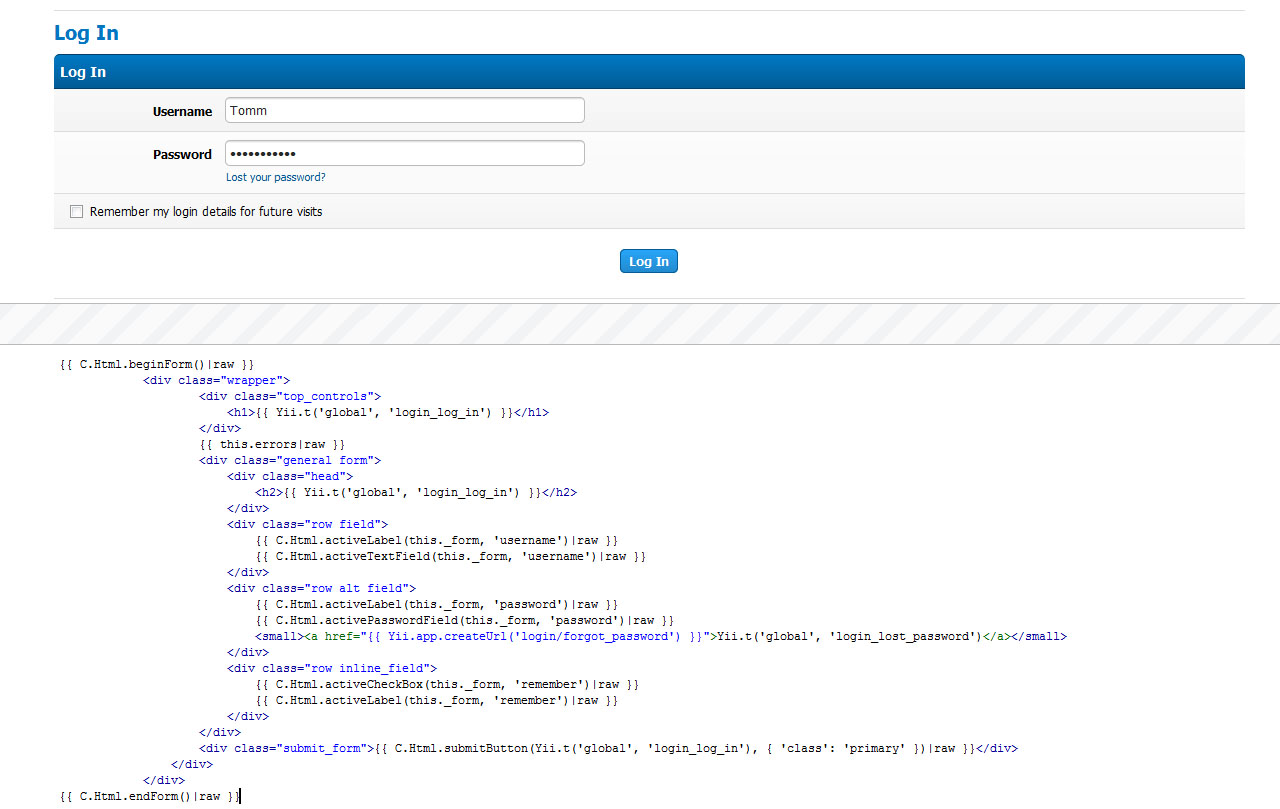
MyBB 2.0 has been written from scratch in a MVC (Model-View-Controller) method and we’ve been using Yii as its base framework. Standing for “Yes It Is!”, Yii is a powerful, very secure and fast framework and after a very long process, we found it to be the best choice for MyBB. Its database abstraction layers introduces various options (including PDO transactions and Active Record, Yii’s Object Relational Mapping (ORM) techniques) and it provides some fantastically simple language and internationalization ideas. We’ve also used the Twig Template Engine for views, increasing security and adding various possibilities of using PHP in templates. You can see an example (currently part of the 2.0 “login” page) of a Twig template and its output in the screenshot to the right.

For languages, we’re embracing Yii’s language translations. As an example, to translate a string in 2.0 you simply call like this:

// Structure of the 'global' language file
return array(
   'mybb_welcome' => 'Welcome to MyBB {version}!',
   'language_string' => 'Another language string',
   'language_string_2' => "Yet another language string that's awesome."
);

// An example of use in the software
// Will display 'Welcome to MyBB {version}!'
$foo = Yii::t('global', 'mybb_welcome');

// Will display 'Welcome to MyBB 2.0!'
$foo = Yii::t('global', 'mybb_welcome', array('{version}' => Yii::app()->mybb->version));

You can call on whatever language file you want from anywhere in the software. Making a language pack is just as easy as it was in 1.6 too – if not easier!

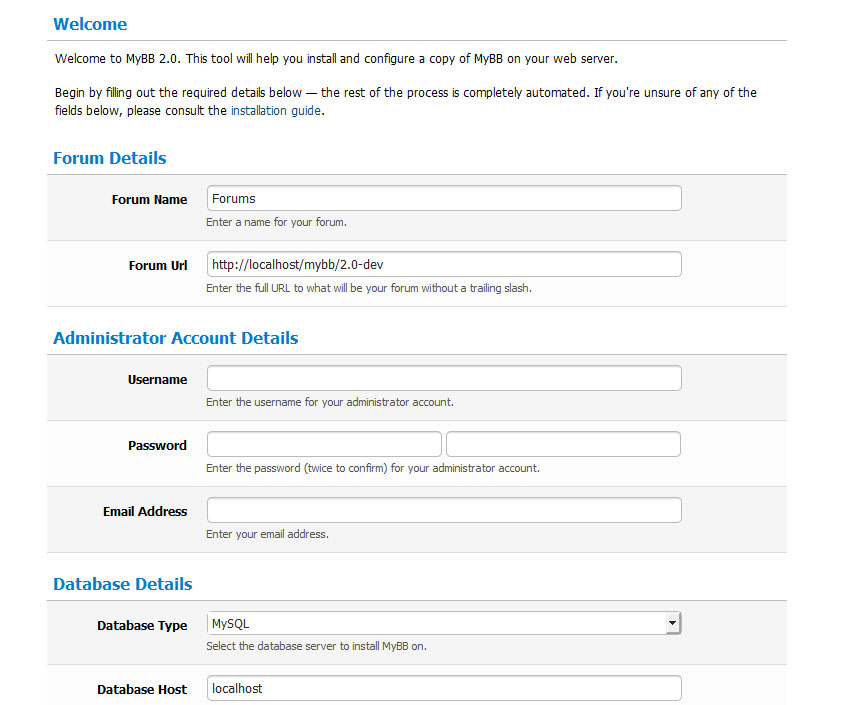
Another area we’re keen to improve on is MyBB’s installer. The new version introduces a one-click install – you just simply enter all your details and the process practically completes itself. See the screenshot of the introduction page!

As you can tell, we have the basics of the software prepped and ready to start. It’s no longer ‘Planning’, but what I would call ‘Pre-Production’ – where we concrete ideas, features and most importantly, a road map, are written. After working with 2.0, I can tell you that the future definitely is exciting. It’s never tasted so good!

Developing for MyBB

Being apart of the MyBB family and developing the future of forum software is no small task. Being volunteers takes dedication and patience as well as the skills to pull off your role. Take a look at Joining the Team, and if you meet the descriptions, send us an application – we’d love to have you on the Team!

Recruiting Creative Doodler

We are pleased to announce that MyBB has decided to develop an official mascot which will be used for a variety of purposes including promoting MyBB and on possible official MyBB merchandise.

As a result, the MyBB Group is in search for a great creative artist “doodler” who can help sketch and design the MyBB Mascot. The artist must have the creative ability to not only sketch the mascot, but be able to make a high resolution digital copy of the sketch(s). The artist must have the ability to work with a team and have the time to bring the MyBB Mascot to life. In addition, the artist must be willing to assign all copyright for their work to the MyBB Group.

Although this is a volunteer position and will not be a  permanent position on the team, their are benefits to joining:

  • The artist will gain access to a specific private forum on the MyBB Community
  • The artist will receive an official team badge
  • The artist will receive due credit on the MyBB Wiki pertaining to the mascot created

If you think you might be the one to fulfill this position, or if you have an inquiry regarding the position,  do get in touch at the following email address: [email protected]. Be sure to provide some samples of your work, both sketches and digital copies of the sketches. In addition, be sure to provide some background information about yourself, and any other information you feel necessary to share.

If you do not receive a direct response from the MyBB Group it doesn’t mean we haven’t received your application, rather, because we receive many applications, we cannot reply to each one individually. Applications sent in the form of private messages on the community forum will not be evaluated or considered.

Thank you for your time, and best of luck for those that apply.

MyBB 1.6.3 and 1.4.16 Security Update

MyBB 1.6.3 and 1.4.16 are now available to download. They fix 1 high risk vulnerability and 1 low risk vulnerability. We recommend everyone upgrades to this release immediately or patch their boards with the manual patching instructions below.

Thanks to Charlie Somerville and thebod for discovering them. These vulnerabilities are:

In addition to the vulnerabilities, the updates also fix the following issues:

All other outstanding issues will be resolved in the next maintainence release.

For MyBB 1.6

The update to MyBB 1.6.3 also upgrades the Prototype and Scriptaculous javascript libraries to their latest versions. This is to help your MyBB forum work properly with Internet Explorer 9.

MyBB 1.6.2 to 1.6.3 Patch
This patch is only for those users running MyBB 1.6.2. If you’re running an older version of MyBB then please download the full version and update to it.

For help upgrading, see the MyBB Wiki: Upgrading.

Please download the attached ZIP archive below and replace the files in your forum directory with those from the ZIP archive.

1.6.3 changed files

You are required to run the upgrader for 1.6.3. After replacing the files above, remove the ‘lock’ file located in forum_root/install/, then visit forum_root/install/upgrade.php and follow the instructions (where forum_root is the web address for your forum). Remember to backup your forum’s files and database before performing this upgrade.

Once the upgrade has completed, visit the Templates & Style area of your ACP – click on Templates on the left and go to the “Find Updated Templates”. Revise and amend all affected templates here, paying attention to headerinclude, index_boardstats and forumdisplay_threadlist.

If you wish to manually patch your board please download “1.6.3 patches” and follow the instructions in that file. You are also required to amend templates to ensure functionality for your board. For this, please download “1.6.3 template patches” and follow the instructions – you must do these for all custom themes you have installed.

1.6.3 patches
1.6.3 template patches

Please remember that applying patches should only be a temporary measure until you can fully upgrade your board. The upgrader is required to run to allow the default templates to be updated with the new security fixes.

Changed Files since 1.6.2

  • inc
    • class_core.php
    • functions_search.php
  • install
    • resources
      • mysql_db_tables.php
      • mybb_theme.xml
      • upgrade12.php
      • upgrade17.php
      • upgrade19.php
      • upgrade3.php
      • upgrade5.php
    • upgrade.php
  • jscripts
    • controls.js
    • dragdrop.js
    • effects.js
    • general.js
    • prototype.js
    • scriptaculous.js
    • slider.js
    • thread.js
  • forumdisplay.php
  • index.php
  • misc.php
  • showthread.php

* Red represents files that contain security updates
* Green represents new files added in this release

For MyBB 1.4

For MySQL 5.5 compatibility and IE9 javascript fixes, please upgrade to MyBB 1.6.3. Support for MyBB 1.4 will be ending on 1st July 2011, after which there will be no more security updates for the 1.4 series.

1.4.15 to 1.4.16 Patches
This patch is only for those users running MyBB 1.4.15. If you’re running an older version of MyBB 1.4, and don’t want to upgrade to 1.6 just yet, then please the latest version of MyBB 1.4 from the MyBB Wiki: Versions.

For help upgrading, see the MyBB Wiki: Upgrading.

Please download the attached ZIP archive below and replace the files in your forum directory with those from the ZIP archive.

1.4.15 changed files

You are required to run the upgrader for 1.4.16. After replacing the files above, remove the ‘lock’ file located in forum_root/install/, then visit forum_root/install/upgrade.php and follow the instructions (where forum_root is the web address for your forum). Remember to backup your forum’s files and database before performing this upgrade.

Once the upgrade has completed, visit the Templates & Style area of your ACP – click on Templates on the left and go to the “Find Updated Templates”. Revise and amend all affected templates here, paying attention to headerinclude, index_boardstats and forumdisplay_threadlist.

If you wish to manually patch your board please download “1.4.16 patches” and follow the instructions in that file. You are also required to amend templates to ensure functionality for your board. For this, please download “1.4.16 template patches” and follow the instructions – you must do these for all custom themes you have installed.

1.4.15 patches
1.4.15 template patches

Please remember that applying patches should only be a temporary measure until you can fully upgrade your board. The upgrader is required to run to allow the default templates to be updated with the new security fixes.

Changed Files since 1.4.15

  • inc
    • class_core.php
    • functions_search.php
  • install
    • resources
      • mybb_theme.xml
    • upgrade.php
  • jscripts
    • general.js
  • forumdisplay.php
  • index.php
  • misc.php
  • showthread.php

* Red represents files that contain security updates
* Green represents new files added in this release

Reporting MyBB security vulnerabilities

If you think you’ve found a vulnerability in MyBB, we advise you not to publicly post it on these forums or publicly release information about it elsewhere until we’ve had time to prepare and release a patch.

As always, you can send through security related messages on the MyBB website from the Contact Us page.

Thank you,
MyBB Team