Some closure on the 1.6.4 Security Vulnerability

A little over two weeks ago we announced the discovery of a rather significant vulnerability which may have effected some users. At the time there was a lot of uncertainty regarding the circumstances, but I feel it’s time to follow up on our original announcement with what has since come to hand. I hope this will answer any outstanding questions, ease some of the concern, and most importantly I hope everyone checks their installations to make sure they are not vulnerable.

First and foremost, I can confirm that the code was malicious and the release was modified on the server by a 3rd party. Therefore, it is crucial that you follow the instructions in the previous blog post to ensure your installation is not vulnerable. The release package was obviously cleaned as soon as the alarm was raised, so if you downloaded MyBB after the first blog post then you don’t need to worry. We aren’t sure exactly when the release packages were tampered with, however if you downloaded your package shortly after the release then you may not have been effected either.

There was unfortunately a vulnerability in the CMS which powers the MyBB home page and downloads system. Using this vulnerability a hacker was able to add a backdoor to one of the files, allowing them to execute arbitrary PHP and manipulate the release packages. The CMS was custom written a number of years ago, however we believe a 3rd party framework used by the CMS contributed to the vulnerability. The CMS shares no code with MyBB so there should be no concern that these events indicate a vulnerability in MyBB. The server is also configured to isolate the subdomains belonging to the MyBB website, so it is unlikely that any data from the community forums or other sections of the site was compromised.

In light of these events, we are looking at making several changes. At the very least we intend to publish checksums with downloads to help identify any future releases which may have been contaminated, we are also looking into automating the verification process using a remote server. Using a CDN to distribute our packages is another option being considered.

MyBB 1.6.5 should be released in the next few weeks but until then please be sure to follow the instructions in the first blog post to secure your board.

1.6.4 Security Vulnerability

When 1.6.4 was announced almost 3 months ago it was one of the biggest updates MyBB has ever released. It fixed over 100 issues and brought performance improvements for MyBB forums – large or small – across the world. It was also popular for people who were new to MyBB – starting their project for the first time.

Unfortunately, the 1.6.4 release files were contaminated by code that was not meant to be there and could open a security vulnerability on your forum. It only affects those that are running 1.6.4.

We advise that you fix the problem as soon as you can. You can do so by following these instructions:

  • Download the latest release of MyBB.
  • Replace ./index.php (in the root folder of your forum) with the one in the download (./Upload/index.php).
  • Remove the ./install/ folder

OR

  • Download and follow the 1.6.4 Patch Instructions
  • If you are unable to find the affected areas, this issue does not affect you. Otherwise, remove the ./install/ folder.

If you have any problems, please report them in the General Support Forum on the Community. If you have renamed ‘index.php’, for example if you’re using the portal as your homepage, please remember to update the correct file accordingly.

We discovered the extent of this problem earlier today but with the release of MyBB 1.6.5 still being a few weeks away, forums need to be patched to protect against any vulnerabilities. We’re still investigating how our release became contaminated and if we find anything else in the mean time, we’ll be sure to let you know.

Reporting MyBB security vulnerabilities

If you think you’ve found a vulnerability in MyBB, we advise you not to publicly post it on these forums or publicly release information about it elsewhere until we’ve had time to prepare and release a patch.

As always, you can send through security related messages on the MyBB website from the Contact Us page.

Thank you,
MyBB Team

MyBB Merge System 1.6.2

MyBB Merge System 1.6.2 is now available on the MyBB website and is a maintenance update to the MyBB Merge 1.6 series.

This release is to ensure that all users of MyBB Merge 1.6 have the latest fixes.

This release fixes several reported issues since the release of 1.6.1, which caused some incorrect functionality of the Merge System. These bugs have been fixed to provide a more stable version of for public use.

What’s fixed in this version?

As always, you can send through security related messages on the MyBB website from the Contact Us page.

Thank you,
MyBB Team

MyBB 1.6.4 Update

Note: you only need to read this if you upgraded to 1.6.4 before this blog post was made. If you have not upgraded yet, you will need this: https://blog.mybb.com/2011/07/26/mybb-1-6-4-released-feature-update-security-maintenance-release/

A few days ago, we released MyBB 1.6.4 – a feature update, maintenance and security release. We’ve noticed one or two problems with this, so we’ve decided to give out an immediate update.

There is no security threat to 1.6.4 – this update fixes a problem with quote tags, split posts and an issue with two templates. To apply this update, please follow these instructions:

  • As usual, backup your forum’s database and files, and switch off your forum’s front end. You may want to follow the Wiki Upgrading Procedure.
  • Download the 1.6.4 Update Files and upload them to your forum – overwriting the existing ones.
  • Delete ./install/lock and visit the upgrader – normally found at yourforum/install/upgrade.php and run the upgrader again. Choose 1.6.3 from the list of versions.

The above process won’t cause any problems with your forum – it merely updates the default templates again to 1.6.4’s versions and adds a database column missing from the original update.

You also need to check two templates – online_today and member_profile_adminoptions. Please see the attached patch file and make the changes where necessary in each of the themes you have installed.

These changes have already been made to the main download of 1.6.4 – so it you’re still waiting to upgrade, now is the time to do it!

Many apologies for the less-than-perfect quality – we’re updating our release procedures so that hopefully in the future we won’t have these problems again.

Thanks you,
MyBB Team

MyBB 1.6.4 Released – Feature Update, Security & Maintenance Release

MyBB 1.6.4 is now available from the MyBB website and is a feature update, security and maintenance release for the 1.6 series.

What’s added/changed in this version?

In 1.6.4, there are 2 new updates and over 100 reported issues fixed.

Please be aware that not all of the existing problems have been fixed in this version. Because of the size of the updates, these will be fixed in a later release.

The 2 new updates included in 1.6.4 are only small – one globally switches on/off plugins and the other detects whether an Administrator has renamed the Portal to check for file verifications.

Security Updates

There are also 3 security updates for 1.6.4. Overall, they are low risk vulnerabilities as they all require administrator permissions – however, one of these is classed as high risk if a user manages to get into the Admin Control Panel (ACP).

As a result of this, it is recommended that only certain types of variables are used in templates that follow the MyBB Development Standards – although other types may be used it the templates are installed to the database through your plugin, Administrators will not be able to save templates with these variables in.

Theme Artists and Plugin Developers should take a close look at the new changes to see if their work will be affected by the new changes and update them accordingly.

Performance

In 1.6.4, there are a number of performance-related updates. These range from small code changes to caching thread prefixes. More information about these are available on 1.6.4’s page in the Wiki.

Almost everyone should be able to see at least some benefits from these changes.

Upgrading from 1.6.3 and Other Versions

Due to the size of this release and due to release errors earlier in the 1.6 series, all files need to be changed. This is to ensure that you have the latest versions of the software’s files which can be hard to trace from earlier releases.

This upgrade process is the same for any version of MyBB. Before performing any upgrade, please remember to backup your forum’s files and database and store them safely. If you have edited core files, please make sure you make a changelog for these changes so you can make them again once the upgrade is complete.

If you have installed plugins that require changes to core files, you will need to make those changes again.

To upgrade, follow the Upgrading process. The upgrade script is required. There are also language and theme changes.

If you require support for upgrading to 1.6.4, please see the 1.6 General Support Forum.

Changes in 1.6.4

We’ve made a handy reference guide to what’s changed in 1.6.4 in the Wiki. We’ll be doing this for each version in the future too so you can see what we’re working on.

View 1.6.4 Changes in the Wiki.

MyBB Merge System 1.6.1 Update

For those users who have been using Merge System 1.6.1 and earlier, there is an important security update ready for you.

You can read more about it in the 1.6.1 Update Blog Post.

Thank you,
MyBB Team

Important security announcement regarding MyBB merge system versions 1.6.1 and earlier.

If you’ve used the MyBB Merge System v1.6.1 or earlier please download the file attached here, upload it to your forum root, and run it by going to http://yourdomain.com/yourforumpath/icr.php for security purposes.

The reason for this is a potential security breach related to the “old db” password being stored in the datacache in plaintext form. Thanks goes to euantor & Malcolm for reporting this.

Developing the Future

After almost 8 years, MyBB has certainly come a long way. Its popularity among forum software is strong, and with the release of 1.6 almost a year ago it just keeps growing and growing. With its simplicity and extensions, there’s really nothing you can’t do with MyBB. Every member of the Team, past and present, are no doubt proud of where we are today.

However, we can’t sit still in the ever moving world of forums and message boards. New software appears – it seems, every month – which people expect MyBB to better, and who are we to disappoint? It’s time for us to develop the future.

MyBB 1.6

While there are no new ‘features’ expected for the 1.6 series of MyBB, we’re still dedicated to maintaining it and making sure your forum (and business) is safe.

1.6.4 – where there are over 100 issues that have been fixed – is going to be available very soon. It fixes some (very) old issues dating back years including some obscure security issues. While none of these are ‘high risk’ issues or bugs, it’s always a nice feeling knowing that your site is as stable as it can be. We aren’t just stopping there though – this version is the first in a minor release to have ‘feature updates’.

These feature updates are small improvements to MyBB – as apposed to feature releases which are big changes – and range from things like a setting to globally switch on/off all plugins to providing better access for Plugin Developers and Administrators to check for updates. These will be coming throughout the 1.6 series – and if they affect Plugin Developers or Theme Artists, we’ll keep you informed before their release on the MyBB Community Forums.

Spam Prevention

This year, there has been somewhat of an explosion in the amount of human-cooked spam. More realistic than the robot kind, this spam can range from signature links to forums filled with posts in hours. While the best method is moderation – and reporting users who do spam – there’s always going to be better methods and controls for protecting your forum and cleaning up after them. That’s why we’re working to produce Spam Ninja – a feature update for the 1.6 series that will introduce basic controls to help you eliminate spam and their robot|human chefs permanently.

The Spam Ninja update will be available later this year and will be completely optional if you use it or not. More information on the new features it introduces will be announced closer to the time.

Alongside maintaining 1.6 however, developing MyBB 2 is just as important.

MyBB 2.0

At MyBB, we tend to keep 2.0 secrets close – it’s not that we don’t want you to know! It’s because as the development process moves on, coding and features are more than likely going to change so we don’t want to promise things that might never materialize. Rest assured, while many may think that 2.0 is a mere myth, it does exist and we’ll be walking through some of the boring stuff that won’t be likely to change.

We’ve made no surprises that Justin – our Lead Designer – has created the awesome 2.0 default theme. It brings sweeping changes to the thread and forum layout that will make MyBB stand out from other software, and contrary to a popular thread on the Community, it definitely does not look like vBulletin. While the software still has that MyBB look and charm, it does mean that we’ve had the chance to reorganize various other areas – such as introducing conversation-style Private Messaging, a simplified User CP and Moderation Queues to make things much more modern, efficient and user friendly. As you would expect, it looks and feels like a state-of-the-art forum system.

While we won’t be showing off the software just yet, we can still keep you in the loop.

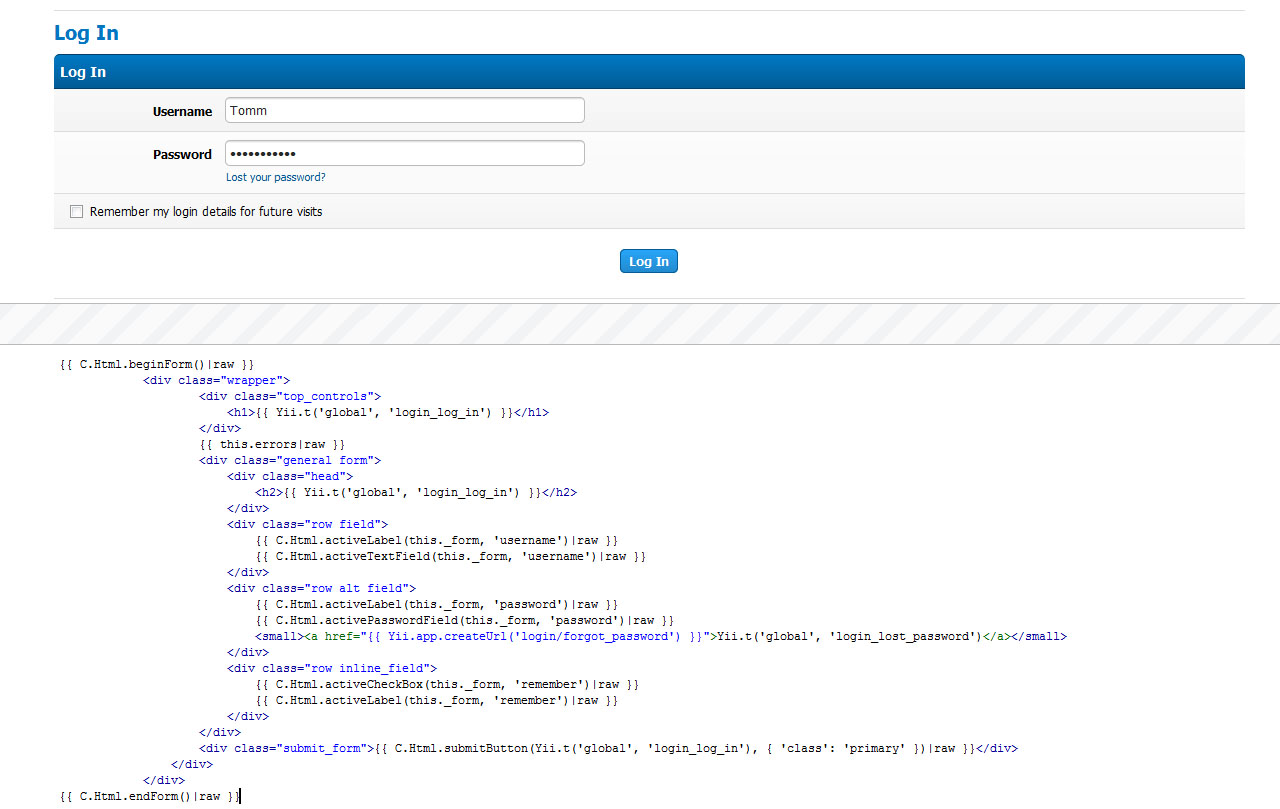
MyBB 2.0 has been written from scratch in a MVC (Model-View-Controller) method and we’ve been using Yii as its base framework. Standing for “Yes It Is!”, Yii is a powerful, very secure and fast framework and after a very long process, we found it to be the best choice for MyBB. Its database abstraction layers introduces various options (including PDO transactions and Active Record, Yii’s Object Relational Mapping (ORM) techniques) and it provides some fantastically simple language and internationalization ideas. We’ve also used the Twig Template Engine for views, increasing security and adding various possibilities of using PHP in templates. You can see an example (currently part of the 2.0 “login” page) of a Twig template and its output in the screenshot to the right.

For languages, we’re embracing Yii’s language translations. As an example, to translate a string in 2.0 you simply call like this:

// Structure of the 'global' language file
return array(
   'mybb_welcome' => 'Welcome to MyBB {version}!',
   'language_string' => 'Another language string',
   'language_string_2' => "Yet another language string that's awesome."
);

// An example of use in the software
// Will display 'Welcome to MyBB {version}!'
$foo = Yii::t('global', 'mybb_welcome');

// Will display 'Welcome to MyBB 2.0!'
$foo = Yii::t('global', 'mybb_welcome', array('{version}' => Yii::app()->mybb->version));

You can call on whatever language file you want from anywhere in the software. Making a language pack is just as easy as it was in 1.6 too – if not easier!

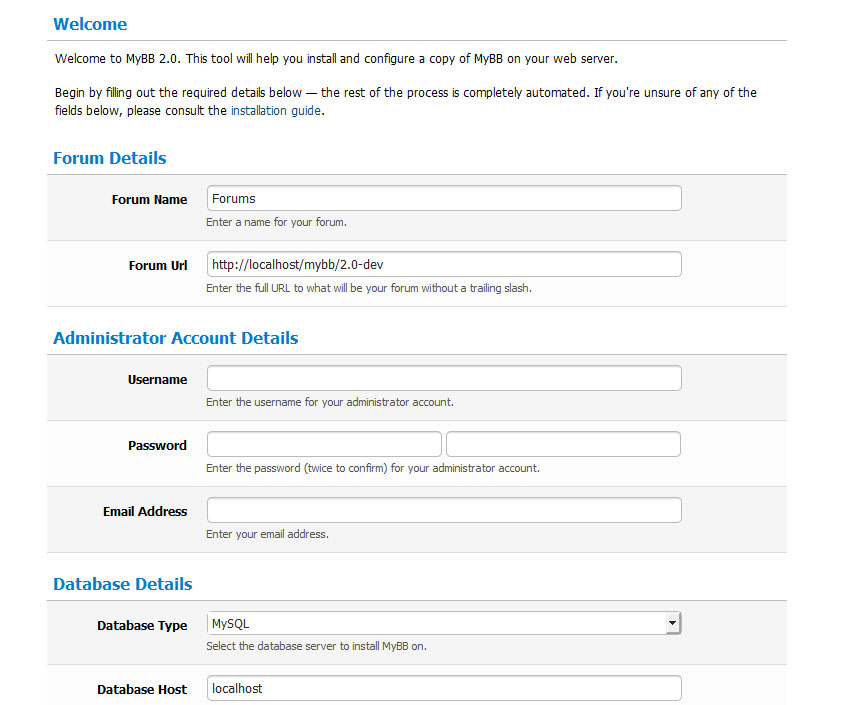
Another area we’re keen to improve on is MyBB’s installer. The new version introduces a one-click install – you just simply enter all your details and the process practically completes itself. See the screenshot of the introduction page!

As you can tell, we have the basics of the software prepped and ready to start. It’s no longer ‘Planning’, but what I would call ‘Pre-Production’ – where we concrete ideas, features and most importantly, a road map, are written. After working with 2.0, I can tell you that the future definitely is exciting. It’s never tasted so good!

Developing for MyBB

Being apart of the MyBB family and developing the future of forum software is no small task. Being volunteers takes dedication and patience as well as the skills to pull off your role. Take a look at Joining the Team, and if you meet the descriptions, send us an application – we’d love to have you on the Team!
MyBB 1.6.3 and 1.4.16 Security Update

MyBB 1.6.3 and 1.4.16 are now available to download. They fix 1 high risk vulnerability and 1 low risk vulnerability. We recommend everyone upgrades to this release immediately or patch their boards with the manual patching instructions below.

Thanks to Charlie Somerville and thebod for discovering them. These vulnerabilities are:

In addition to the vulnerabilities, the updates also fix the following issues:

All other outstanding issues will be resolved in the next maintainence release.

For MyBB 1.6

The update to MyBB 1.6.3 also upgrades the Prototype and Scriptaculous javascript libraries to their latest versions. This is to help your MyBB forum work properly with Internet Explorer 9.

MyBB 1.6.2 to 1.6.3 Patch
This patch is only for those users running MyBB 1.6.2. If you’re running an older version of MyBB then please download the full version and update to it.

For help upgrading, see the MyBB Wiki: Upgrading.

Please download the attached ZIP archive below and replace the files in your forum directory with those from the ZIP archive.

1.6.3 changed files

You are required to run the upgrader for 1.6.3. After replacing the files above, remove the ‘lock’ file located in forum_root/install/, then visit forum_root/install/upgrade.php and follow the instructions (where forum_root is the web address for your forum). Remember to backup your forum’s files and database before performing this upgrade.

Once the upgrade has completed, visit the Templates & Style area of your ACP – click on Templates on the left and go to the “Find Updated Templates”. Revise and amend all affected templates here, paying attention to headerinclude, index_boardstats and forumdisplay_threadlist.

If you wish to manually patch your board please download “1.6.3 patches” and follow the instructions in that file. You are also required to amend templates to ensure functionality for your board. For this, please download “1.6.3 template patches” and follow the instructions – you must do these for all custom themes you have installed.

1.6.3 patches
1.6.3 template patches

Please remember that applying patches should only be a temporary measure until you can fully upgrade your board. The upgrader is required to run to allow the default templates to be updated with the new security fixes.

Changed Files since 1.6.2

  • inc
    • class_core.php
    • functions_search.php
  • install
    • resources
      • mysql_db_tables.php
      • mybb_theme.xml
      • upgrade12.php
      • upgrade17.php
      • upgrade19.php
      • upgrade3.php
      • upgrade5.php
    • upgrade.php
  • jscripts
    • controls.js
    • dragdrop.js
    • effects.js
    • general.js
    • prototype.js
    • scriptaculous.js
    • slider.js
    • thread.js
  • forumdisplay.php
  • index.php
  • misc.php
  • showthread.php

* Red represents files that contain security updates
* Green represents new files added in this release

For MyBB 1.4

For MySQL 5.5 compatibility and IE9 javascript fixes, please upgrade to MyBB 1.6.3. Support for MyBB 1.4 will be ending on 1st July 2011, after which there will be no more security updates for the 1.4 series.

1.4.15 to 1.4.16 Patches
This patch is only for those users running MyBB 1.4.15. If you’re running an older version of MyBB 1.4, and don’t want to upgrade to 1.6 just yet, then please the latest version of MyBB 1.4 from the MyBB Wiki: Versions.

For help upgrading, see the MyBB Wiki: Upgrading.

Please download the attached ZIP archive below and replace the files in your forum directory with those from the ZIP archive.

1.4.15 changed files

You are required to run the upgrader for 1.4.16. After replacing the files above, remove the ‘lock’ file located in forum_root/install/, then visit forum_root/install/upgrade.php and follow the instructions (where forum_root is the web address for your forum). Remember to backup your forum’s files and database before performing this upgrade.

Once the upgrade has completed, visit the Templates & Style area of your ACP – click on Templates on the left and go to the “Find Updated Templates”. Revise and amend all affected templates here, paying attention to headerinclude, index_boardstats and forumdisplay_threadlist.

If you wish to manually patch your board please download “1.4.16 patches” and follow the instructions in that file. You are also required to amend templates to ensure functionality for your board. For this, please download “1.4.16 template patches” and follow the instructions – you must do these for all custom themes you have installed.

1.4.15 patches
1.4.15 template patches

Please remember that applying patches should only be a temporary measure until you can fully upgrade your board. The upgrader is required to run to allow the default templates to be updated with the new security fixes.

Changed Files since 1.4.15

  • inc
    • class_core.php
    • functions_search.php
  • install
    • resources
      • mybb_theme.xml
    • upgrade.php
  • jscripts
    • general.js
  • forumdisplay.php
  • index.php
  • misc.php
  • showthread.php

* Red represents files that contain security updates
* Green represents new files added in this release

Reporting MyBB security vulnerabilities

If you think you’ve found a vulnerability in MyBB, we advise you not to publicly post it on these forums or publicly release information about it elsewhere until we’ve had time to prepare and release a patch.

As always, you can send through security related messages on the MyBB website from the Contact Us page.

Thank you,
MyBB Team

MyBB Merge System 1.6.1 Release

MyBB Merge System 1.6.1 is now available on the MyBB website and is a maintenance update to the MyBB Merge 1.6 series.

This release is to ensure that all users of MyBB Merge 1.6 have the latest fixes.

This release fixes several reported issues since the release of 1.6.0, which caused some incorrect functionality of the Merge System. These bugs have been fixed to provide a more stable version of for public use.

What’s fixed in this version?

  • 27 bug fixes (view all)
  • Folder renamed from “convert” to “merge” inside the zip, to make it consistent with the fact that this is a Merge System, not a Converter.

As always, you can send through security related messages on the MyBB website from the Contact Us page.

Thank you,
MyBB Team

MyBB 1.6.1 Release & 1.4.14 Update

MyBB 1.6.1 is now available on the MyBB website and is a security and maintenance update to the MyBB 1.6 series. A patch has also been made available to provide the security updates for the MyBB 1.4 series.

This release is to ensure that all users on MyBB 1.6 have the latest fixes, and to patch two medium-risk security issues within MyBB.

This release fixes several reported issues since the release of 1.6.0, which caused some incorrect functionality of MyBB. These bugs have been fixed to provide a more stable version of MyBB for public use.

What’s fixed in this version?

  • Two XSS Vulnerabilities in editpost.php, member.php and newreply.php – Thank you to YGN Ethical Hacker Group for alerting us of these issues.
  • 90+ bug fixes (view all)

This release has been tested by our Software Quality Assurance group.

The following files were changed since the initial MyBB 1.6 release:

  • calendar.php
  • editpost.php
  • forumdisplay.php
  • member.php
  • misc.php
  • modcp.php
  • moderation.php
  • newreply.php
  • newthread.php
  • polls.php
  • portal.php
  • printthread.php
  • private.php
  • reputation.php
  • showthread.php
  • usercp.php
  • xmlhttp.php
  • admin
    • inc
      • class_page.php
      • functions.php
      • functions_view_manager.php
    • jscripts
      • codepress
        • languages
          • css.css
      • imodal.js
    • modules
      • config
        • badwords.php
        • banning.php
        • calendar.php
        • help_documents.php
      • forum
        • announcements.php
        • management.php
      • home
        • credits.php
        • preferences.php
      • style
        • templates.php
        • themes.php
      • tools
        • recount_rebuild.php
      • user
        • groups.php
        • users.php
      • styles
        • sharepoint
          • avatar_gallery.css
  • inc
    • datahandlers
      • post.php
      • user.php
    • languages
      • english
        • admin
          • config_badwords.lang.php
          • forum_management.lang.php
          • tools_recount_rebuild.lang.php
          • tools_statistics.lang.php
        • moderation.lang.php
        • portal.lang.php
        • reputation.lang.php
        • usercp.lang.php
        • xmlhttp.lang.php
      • english.php
    • tasks
      • delayedmoderation.php
      • promotions.php
      • userpruning.php
    • class_core.php
    • class_custommoderation.php
    • class_datacache.php
    • class_moderation.php
    • class_parser.php
    • functions.php
    • functions_forumlist.php
    • functions_indicators.php
    • functions_online.php
    • functions_post.php
    • functions_search.php
    • functions_user.php
  • install
    • resources
      • mybb_theme.xml
      • settings.xml
      • upgrade17.php
      • upgrade18.php
    • index.php
  • jscripts
    • editor.js

* Red represents files that contain security updates
* Green represents new files added in this release

MyBB 1.6.0 to MyBB 1.6.1 Security Patch

This patch is only for users running MyBB 1.6.0. If you are running an older version of MyBB then please download MyBB 1.6.0 from the MyBB site and update to it using the general [Wiki: Upgrading] guide.

If you wish to manually patch your board please download “mybb_1600_patches.txt” and follow the instructions in that file.

mybb_1600_patches.txt

The manual patch set instructions only fixes the security vulnerabilities and is only made available to temporarily secure your forum until you have time to run the complete upgrade.

MyBB 1.6.0 to MyBB 1.6.1 Full Upgrade

When upgrading from 1.6.0, you will not lose any custom themes, plugins or language packs which you may have installed.

Follow the general [Wiki: Upgrading] guide outlined on the MyBB Wiki to complete the upgrade process. You may download a ZIP archive of changed files here:

changed_files_1601.zip

Please download the attached ZIP archive and replace the files in your forum directory with those from the ZIP archive.

This update does require running the upgrader.
There are database schema, language string, or template changes in this version.

You must then check for modified templates using the instructions below.

Theme and template changes

Using the “Find Updated” link under the “Templates” page in the Admin CP you can find a list of the templates that have changed in this release that you’ve got one or more custom copies of.

After identifying changed templates using the tool you can either revert your custom template to the default (delete it) or use the “diff” tool to perform a difference analysis on your custom template and the default.

“Revert required” indicates that for this template to work correctly with MyBB 1.6.1 you’ll either need to revert it to the default or modify your custom template to include the changes in the default. If a revert is not required your custom version of the template should work perfectly fine.

Template changes

Since MyBB 1.6.0 the following templates have had changes to them:

  • portal_latestthreads_thread
  • showthread_poll_option_multiple
  • usercp_nav_misc

* Red represents the template must be updated or reverted to fix security problems

Language file changes

Since MyBB 1.6.0 the following language files have had changes to them:

  • moderation.lang.php
  • portal.lang.php
  • reputation.lang.php
  • usercp.lang.php
  • xmlhttp.php
  • admin
    • config_badwords.lang.php
    • forum_management.lang.php
    • tools_recount_rebuild.lang.php
    • tools_statistics.lang.php

Either update your language packs to include the changes in these files or revert to the standard English language pack.

MyBB 1.4.14 Update

MyBB 1.4.14 was released on August 3rd 2010 to provide full PHP 5.3 functionality as well as improved attachment management. If you’re still using 1.4.13, it is recommended to upgrade to 1.4.14. You can do this by following the instructions in the MyBB 1.4.14 Release Announcement. The changed files package has been updated with the latest security fixes.

Please note all users of the 1.4.x series are urged to upgrade to the latest release of MyBB (1.6.1).

This patch is only for users running MyBB 1.4.14 or any previous release of the MyBB 1.4 series. Please download “mybb_1414_patches.txt” below and follow the manual patching instructions.

mybb_1414_patches.txt

Reporting MyBB security vulnerabilities

If you think you’ve found a vulnerability in MyBB, we advise you not to publicly post it on these forums or publicly release information about it elsewhere until we’ve had time to prepare and release a patch.

As always, you can send through security related messages on the MyBB website from the Contact Us page.

Thank you,
MyBB Team