Exponential Project Update

mybb-exponential@4x

MyBB’s ecosystem spans across several platforms connecting contributors, authors, and users. In this post, we’ll collect a number of recent highlights from around the Project.

10³ Stars on GitHub

Software is often divided into closed- and open-style development.

Back in 2009, MyBB switched from the former to the latter, enabling administrators and developers, who tweak their forums in the most random ways, to submit and see their fixes in official releases. The move also opened up the development process and allowed a crowd of enthusiasts to critique any upcoming changes and test them on their own servers, and with custom plugins.

Since then, code from 100+ contributors has made its way into MyBB, and earlier this year, the Project’s main repository passed the symbolic threshold of 1K stars from members of the open source community.

If you have patches of your own, or would like to otherwise make MyBB a better forum software, explore some of the options in the CONTRIBUTING.md file.

10² Stars for Top Extensions

If you’ve been using MyBB, you’ll know that the core package is only a part of its identity: extensions have an important place in the ecosystem that’s been maturing for two decades.

Today, the Extend platform hosts over 1300 projects that have published more than five thousand releases downloaded well over two million times, and a pair of extensions have already crossed the 100-star mark — taking a portion of over 6.5 thousand stars given in total.

Starring projects allows you to find them in a single place when you’re ready to start your new forum, and subscribing to them (which was done more than a thousand times) will notify you of new releases to check out.

As we work to define MyBB as lightweight software with modern features, we aim to further strengthen extensions as a pillar of the application by building authoring aids and APIs into the core to make the experience easier and more pleasant for everyone involved.

10¹ Development News

In recent months, numerous key elements of the upcoming series have taken shape. Read ten notes about the View system, extending MyBB, merged features, requirements, and upcoming works in the 1.9 Development Milestone thread.

We have also published a Quick Start cheatsheet, allowing you to set up the development branch and preview it right away using your favorite workflow.

If you’re ready for some tinkering and a deeper dive, read Experimenting with Inheritance Basics, where we make use of the new theming system and track how the application handles it so far.

10⁰ Familiar-looking Theme

When patrolling the Extend section, we noticed one submission was particularly reminiscent, but we couldn’t put our finger on it. A careful investigation that included, among other methods, reading its documentation revealed that it’s MyBB 1.9’s official theme — for MyBB 1.8.

The Curves UI takes the upcoming series’ look and backports it visually into the current stable version. It is also maintained on GitHub, where you can work with authors to improve it further.

It joins many responsive Community-maintained themes, so it’s another good starting point for customization, and if you’re looking to prepare your forum for the style transition into 1.9.x, you can now use its latest build to make the eventual switch extra smooth.

The Base

With the Community-driven environment giving the Project its power, the base of organizing work and tying up all loose ends is done by the MyBB Team.

To ensure this exponentiation yields the best product, we’ve recently brushed up and published the list of Roles, including ten nonmanagement focus areas within the Team. Those now include separate teams for testing and developer relations, in adjustment according to the direction we’d like to take.

While those spots are often filled through invitation, if some of the listed activities pique your interest, tell us about it (the worst you’ll get is a friendly nudge in the right direction on how to make a positive impact!).


If you’d like to keep up to date with various news related to MyBB development and the Project behind it on the fediverse, use our verified handle @[email protected].
2.0 dev post #4

It’s that time again, time for another MyBB 2.0 dev blog! This post is the fourth in a series of development update posts regarding MyBB 2.0.  Currently in pre-alpha, MyBB 2.0 is the long awaited upcoming major version of the open source MyBB forum software.  We’ll be posting regular updates (we promise!) in regards to the development to keep you all updated. The development team have been hard at work since our last dev post, adding new features and polishing existing functionality. This post will explore some of these new features and highlight our approach to the development of the system.

This month has been slightly slower than most due to many of our team members being busy finishing up university courses, exams and more. However, we’ve still managed to work away on new features and plan out new features. In this post, we will review some of the exciting new features and some of the plans we have for the future of 2.0. Continue reading

2.0 dev post #2

It’s that time again, time for another MyBB 2.0 dev blog! This post is the second in a series of development update posts regarding MyBB 2.0.  Currently in pre-alpha, MyBB 2.0 is the long awaited upcoming major version of the open source MyBB forum software.  We’ll be posting regular updates (we promise!) in regards to the development to keep you all updated. The development team have been hard at work since our last dev post, adding new features and polishing existing functionality. This post will explore some of these new features and highlight our approach to the development of the system. Continue reading

Team Changes and Moving Forward

With the release of MyBB 1.6.13, the team felt there was a need to address some issues that affect the future of the Project, the Community and the Team in general.

Developers and MyBB Development Workflow

With the departure of Nathan and Tomm, MyBB has once again found itself in need of active team members. This, along with the unavailability of most current developers due to time constraints caused by life issues, led to us breaking our workflow, which as you may have noticed ended up delaying the release of MyBB 1.6.13. After MyBB 1.6.13 was out, work on 1.8 Beta 1 has been resumed (and you can clearly see that by examining the commits made for on github in the ‘feature’ branch).

Moving forward with 2.0.

Initially 1.6 was supposed to lead to 2.0 directly, but with the team feeling that 2.0 was still in very early development, MyBB would lose to its competitors for quite a bit of time (the development time of 2.0). Thus, work was put into “modernizing” the look and feel of 1.6 before the complete rewrite, and so 1.8 was born. As anticipated, this has delayed work on 2.0 of course. Once 1.8 is released (Beta 1 is nearing its completion; at time of writing only one feature is left to finish: jQuery conversion; all the other open issues aimed for Beta 1 are bugs) work will start on 2.0. There has been a lot of talk of MyBB being a “dead project”, but this is very far from the truth. As an open source project, as long as we have active developers, the project will never be “dead”. But we need the community’s help – we’ve been helping you for a long time, we’re asking you to help us now  – so if you feel that you know MyBB pretty well but most of all, if you feel that you have value to give to the team and project, contact us!

Changes that we are implementing now

It became apparent to us, that one of the major problems we have had was losing key team leaders. As you may remember, we recently got rid of the “Team Leader” role, and went with a more equal structure. This did not promote (as we had intended) productivity. So we have come up with a new system, whereby developers will take turns taking the “lead” on a per version basis. This will keep them all updated with the procedures required to package and release new versions. We are pleased to announce the Stefan T will be assuming the role of Lead Developer first and and the next should be Pirata Nervo (after that a new internal poll will be made). We are also pleased to announce that King Louis will be assuming the position of SQA team lead (the leader here doesn’t change as we believe the SQA team requires a static leader).

Recruitment

As mentioned above, we are now looking for more active members for both Development, Support, and more importantly SQA (we’re running low here!).  If you feel that you would be a good addition to the team, why not submit some pull requests on Github and/or drop an application to using the contact form, posting a thread in Private Inquiries (recommended) or even by PM’ing us.  You cand read more about the responsibilities here. Do not be afraid of contacting us, we won’t bite you – but we’ll be always be honest with you.


Using Pirated Mods

Recently we have been made aware of several MyBB plugins circulating around the internet, in particular pirated mods, which are specifically designed to cause malicious harm to their users. One specific example which has come to our attention attempts to delete all the records from your database, and delete your MyBB files. This would obviously have a devastating impact on anyone who happened to install this plugin.

We’d like to remind users of the immense power plugins have which, when used incorrectly, could pose security implications for your forum.  Theme files also can contain backdoor PHP scripts which can grant access to your server.  Therefore, great care should be taken both in terms of which plugins are installed and where the modifications were obtained from. Specifically, nulled or pirated mods pose the biggest threat of all given that the origin of the file is unknown and any sharer could have inserted malicious code.

Even when downloading mods directly from the author we recommend thoroughly researching both the plugin/theme and the author to establish that they are reputable and have a good standing with their customers and users.

If you have any further questions, concerns or examples please don’t hesitate to contact us via the Private Inquiries forum.

Regards, The MyBB Team.

Road to 1.4

Well… it’s been a long journey folks; With MyBB 1.4 released, we thought it might be a good idea to tell you how 1.4 got to where it is today. So without further ado, we present to you the Road to MyBB 1.4.

April 2006:

The first pre-alpha mockups of the ACP are shown internally to the staff. Ideas are collected for 1.4 and discussed and our general feature list is planned.

September 2006:

MyBB 1.4’s development pace starts picking up once MyBB 1.2 Final is released.

October 2006:

MyBB 1.4’s new ACP is being planned and drafted.

February 2nd, 2007:

After 8 rewrites, MyBB 1.4’s ACP’s core is finally written. The first page, the settings page, is started.

March 2007:

MyBB 1.4’s new ACP base/core continues to be improved. Some beginning pages (Dashboard/Credits) are done and others are in progress. A chunk of front-end features are in the works or completed.

October 21st, 2007:

A good portion of the MyBB 1.4 ACP is done. 99% of MyBB’s front-end features are done. This day MyBB 1.4 is open to a select few for beta testing.

March 19th, 2008:

The first download of MyBB is available to testers. All of the ACP is completed except the Themes page. 100+ bugs were reported and fixed within this timeframe. More testers are invited.

May 2nd, 2008:

The second refresh of MyBB is available to testers. All of the ACP is completed. 100+ bugs were reported and fixed in this timeframe. All of the translators, and many mod creators and theme creators were invited at this time.

June 23rd, 2008:

The sixth refresh of MyBB is available to testers. Bug reports have slowed. Since refresh two over 300+ bugs were fixed.

June 26th, 2008:

A publicly joinable private beta of MyBB is open to users.

July 6th, 2008:

The second beta of MyBB 1.4 is posted, including 40+ bug fixes from Beta 1.

August 3rd, 2008:

MyBB 1.4 is released.

All in all, in the development timeframe of 1.4 over a quarter of a million lines of code have changes in over 1,700 commits, over 500 bugs were fixed and many additional suggestions were implemented during our 6+ month beta process.

Also, throughout this process the MyBB Merge System was being worked on and the MyBB 1.2 series was being maintained.

We hope everyone enjoys the new functionality and changes we’ve provided in MyBB 1.4 🙂

Preparing your Plugins for 1.4

Hello,

With the MyBB 1.4 release pending ever closer, we are stepping up to get your plugins ready for 1.4. There are two main things you should do:

  • Update your plugins to work with MyBB 1.4 ahead of time.
    MyBB 1.4 Beta has been available to download to those who request it. Requesting it is easy. Just click here, find “MyBB 1.4 Beta Testers” and click “Join Group”. For the reason, we suggest you put “Upgrade Plugins to 1.4”, which will let us know you want to upgrade your plugins to 1.4. Theme authors may also do the same thing. It’s very important to us to make sure we give the time and resources necessary, in order to make your transition to 1.4 as smooth as possible.
  • Can’t upgrade your plugins in time for 1.4’s release? Here’s what we recommend:
    GUID’s (Globally Unique Identifiers) are used in MyBB 1.4’s plugin system to allow users to check their plugins for updates. If you were to add your plugin’s assigned guid to your plugin, prior to the release of 1.4, the users who update to it and who download it from there on out, will be able to use the version checking functionality. There is no harm in adding a guid to any 1.2 designed plugin. Versions below MyBB 1.4 will just ignore it. We also recommend adding ‘compatibility clauses’. More information on adding GUID’s and compatibility clauses to your plugin can be found below.

What is a GUID?
Your GUID is a unique identifier that has been generated for your plugin. By including this GUID in your plugin file (see below), users of MyBB 1.4 will be able to check for new versions of your plugin on the MyBB Mods server, with a click from their Admin CP. To allow users to take full advantage of this functionality, please follow the instructions below to add your GUID to your plugin file.

What is a ‘compatibility clause’?
Your ‘compatibility’ clause is a way to tell MyBB which versions of MyBB your plugin will work on. This adds the ability to stop users from installing or running plugins that won’t work with their version of MyBB. To allow users to take full advantage of this functionality, please follow the instructions below to add your ‘compatibility clause’ to your plugin file.

Implementing your GUID & Compatibility Clause
To implement your GUID & ‘compatibility clause’ into your plugin, you need simply add it to the info function of your plugin before uploading it below.

PHP Code:

 'test',
        'description' => 'test',
        'website'     => 'http://mods.mybboard.net/',
        'version'     => '1234',
        'author'      => '',
        'authorsite'  => 'http://your-site.com/',
        'guid'        => '1234567890abcdefghijklmopqrstuvwxyz',
        'compatibility' => '14*',
    );
}
?>

More information on changes in 1.4 that will require changes in your plugins can be found here: http://blog.mybboard.net/2008/07/11/plugin-upgrade-guide-for-plugin-authors/

Plugin Upgrade Guide (for Plugin Authors)

As we approach the release of MyBB 1.4 and the code is finalized I thought it would be a good idea to take some time and write an in-depth guide on how to upgrade your plugins for MyBB 1.4.

First are the required code changes in MyBB 1.4:

  • TABLE_PREFIX is not used anymore except in $db->query().
    • In MyBB 1.2 it would look like this: $db->simple_select(TABLE_PRFEFIX.”users”, “*”, “uid=’1′”);
    • In MyBB 1.4 it now looks like this: $db->simple_select(“users”, “*”, “uid=’1′”);
  • All “yes”/”no” columns have been converted to 1/0 for speed improvements. All plugins will need to change this.
  • The function is_moderator() now returns true/false in MyBB 1.4 versus the old “yes”/”no” in MyBB 1.2.
  • sprintf() is no longer used in MyBB. If you use sprintf() now use $lang->sprintf() instead.
  • Links to forums/threads/posts now use functions to generate them because of the SEO in MyBB 1.4:
    • get_thread_link(arg1 thread id, [arg2 page,] [arg3 action])
    • get_forum_link(arg1 forum id, [arg2 page])
    • get_post_link(arg1 post id, [arg2 thread id])
    • get_profile_link(arg1 user id)
    • get_announcement_link(arg1 announcement id)
    • get_event_link(arg1 event id)
    • get_calendar_link(arg1 calendar id, [arg2 year,] [arg3 month,] [arg4 day])
    • get_calendar_week_link(arg1 calendar id, [arg2 week])
  • All queries in your mods that write data to the database and use $db->query() will now have to use $db->write_query(). You won’t have to worry about queries that use simple_select or update_query as they automatically assign it to the correct function. By doing this, you can make your plugin compatible with forums that run on multiple servers. These forums are usually large, in the scale of millions of posts or more.
  • rebuildsettings() has been renamed to rebuild_settings(). Plugins looking for backward-compatibility should execute a check to function_exists before defining their own rebuild_settings() function in order not to have “function already defined” errors.
  • Plugins using the Moderation class should take note of a few changes to the function parameters
    • tid and fid are no longer passed into Moderation::unapprove_posts and Moderation::approveposts
  • Any plugins written to add / change functionality to the Administration Control Panel (ACP) will have to be completely rewritten. The changes needed to be made are too vast and too complex to be covered in this article. However, take a look at the ‘Akismet’ plugin bundled with MyBB 1.4 for examples of how to use the Admin Control Panel functionality.

Second, the suggested changes in MyBB 1.4:

  • There are two new fields for the information array in your plugin:
    • guid and compatibility.
    • guid’s (Globally Unique Identifiers) are assigned to plugins on the MyBB Mods site and can be put in plugins to allow for “Plugin Updates” via the new ACP page in MyBB 1.4.
    • compatibility can be set to “14*” so MyBB knows in the future which plugins work and don’t work with the next version of MyBB.
  • The ‘website’ field should point towards the URL to your plugin on the MyBB Mods website (or the link to the plugin where it is hosted at.) We’ve noticed that it’s been a common misconception to use that field to point towards your own personal site, while it’s intention was to be used to allow the average admin to go directly to the plugin’s page and check for updates, etc.

There is of course more material not covered that is out of the scope of this article. If you have any questions feel free to ask where appropriate.

MyBB 1.4 Admin CP – The Complete Overview (Part 4)

Welcome back for the final installment in our Complete Admin CP Overview. First and foremost I would like to thank all of you who had submitted their questions for this week’s blog post. Second, today we will be going over the Templates & Themes tab and some of the cool things we did to make your experience easier!

Templates

Template editing hasn’t seen many updates, but there are quite a few tiny changes to generally make template management easier and more user friendly.

Template Sets
Template Groups
Adding a template set
Editing a template set

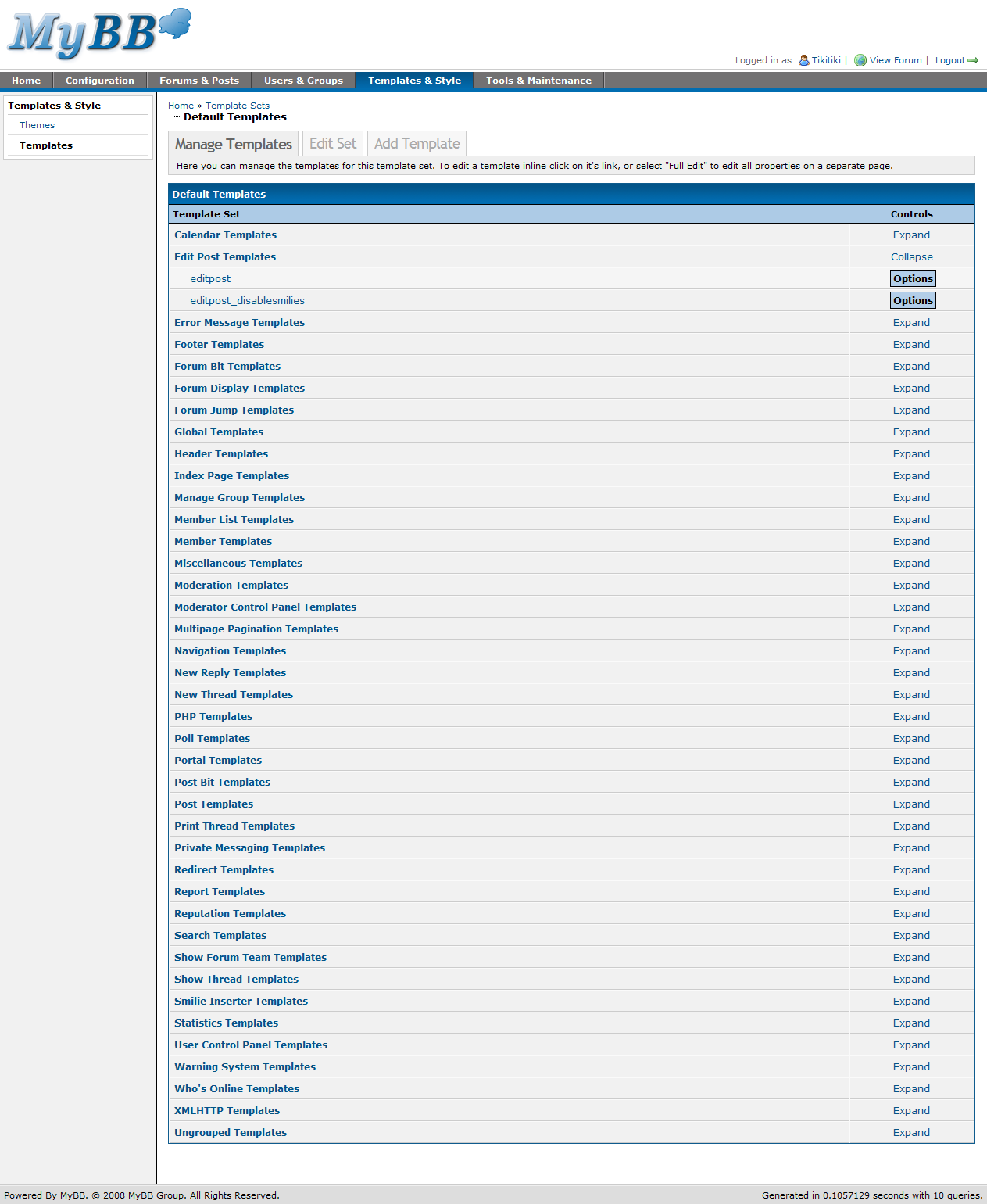
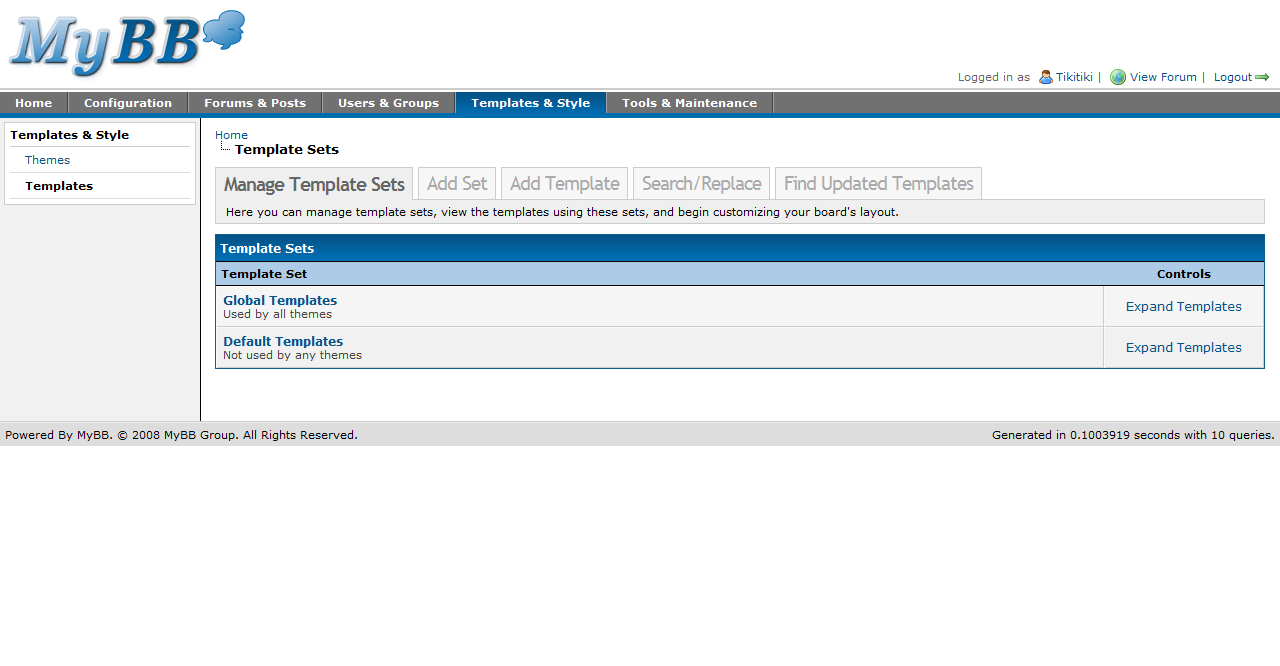
Little has changed with the template sets and template groups listing, just a bit of cleaning for both pages. However, you’ll notice that all templates are now in a group. Any templates that don’t have a group are found under “Ungrouped Templates.” Also, multiple template groups can be open at once, and after leaving the page to edit a template, the template groups you had opened beforehand remain open.

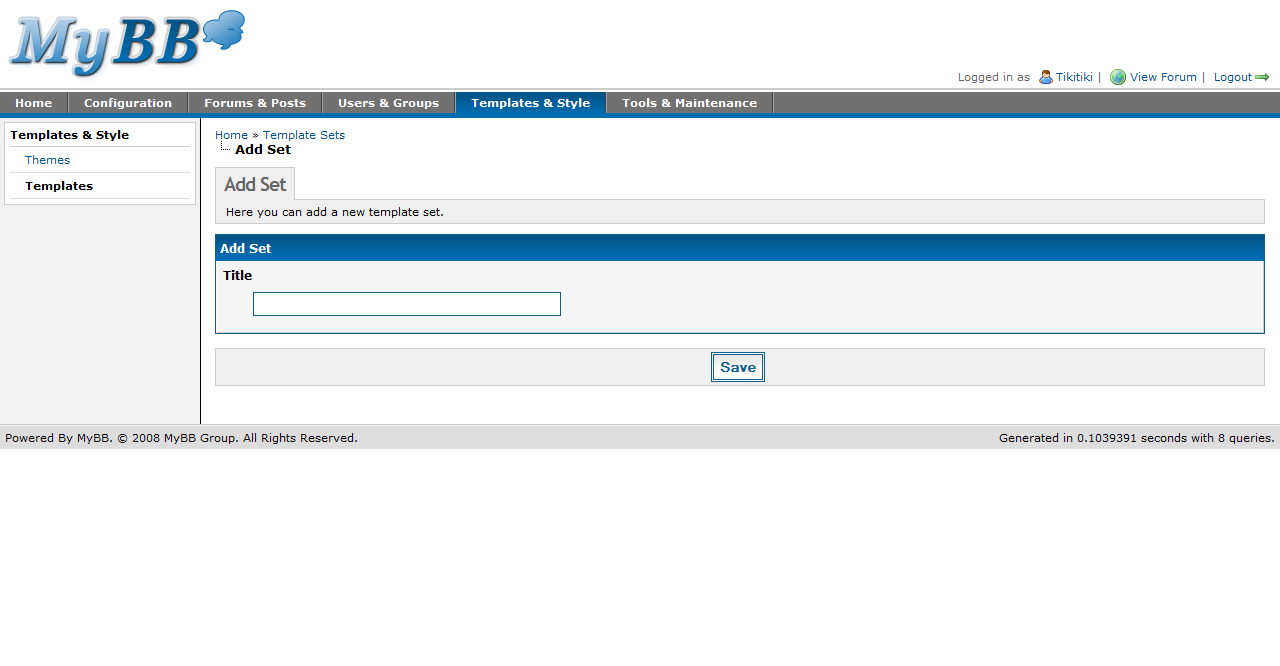
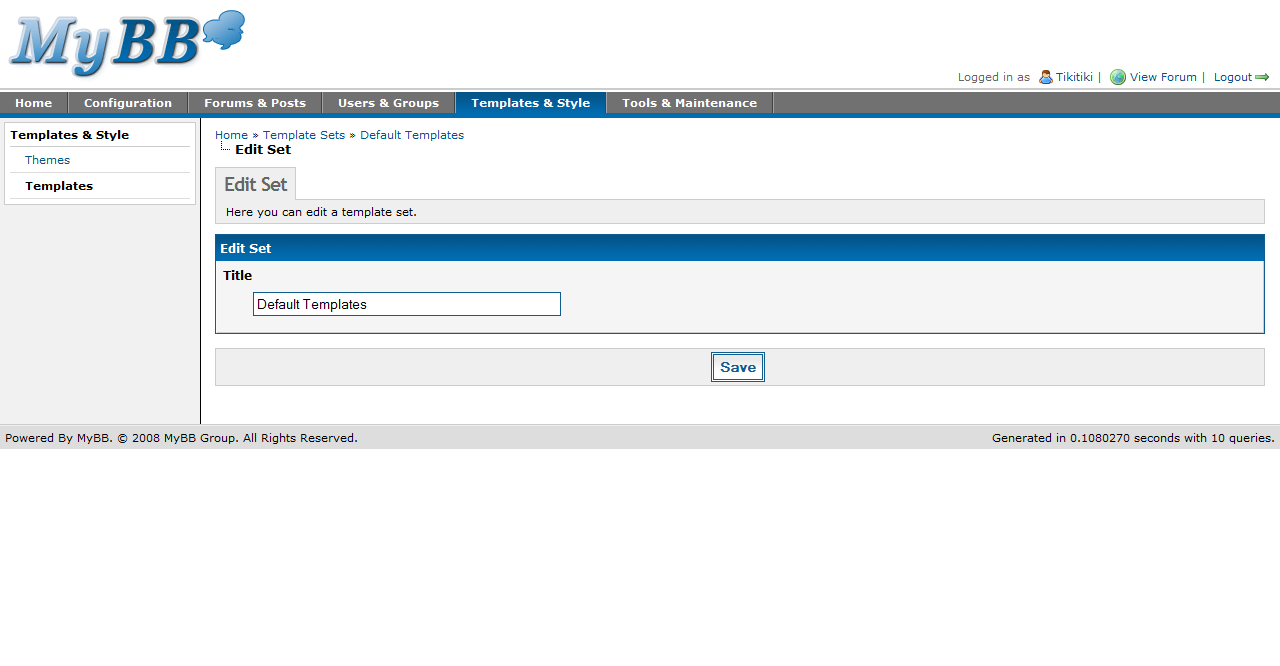
Adding and editing a template set is more or less the same as in 1.2; there is still just one option – the name of the template set.

Editing a template
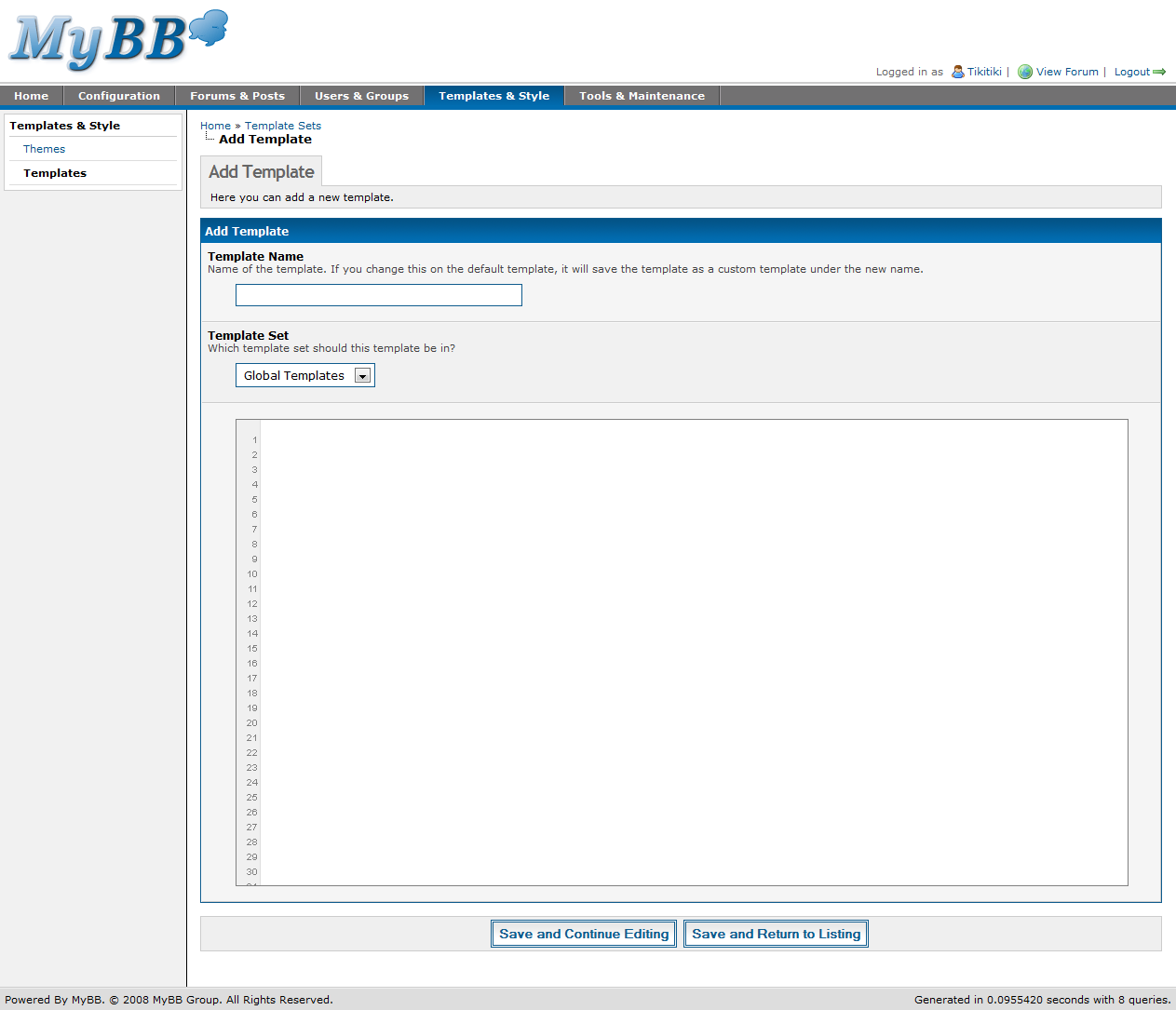
Adding a template

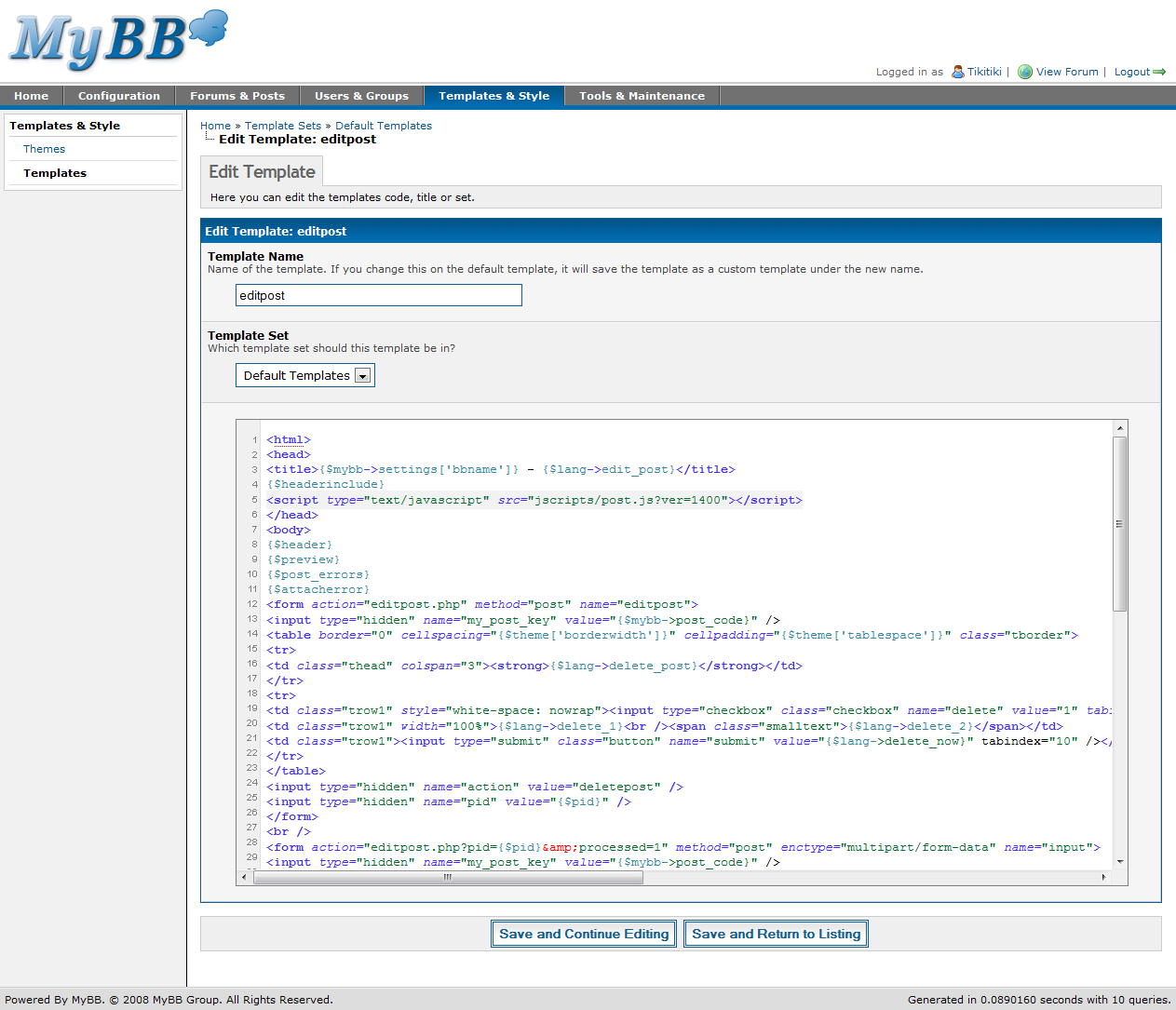
Template editing has seen a huge change – both when adding templates and editing existing ones. Now, MyBB uses Codepress to provide syntax highlighting, line numbering, and a more code-friendly interface for editing overall.

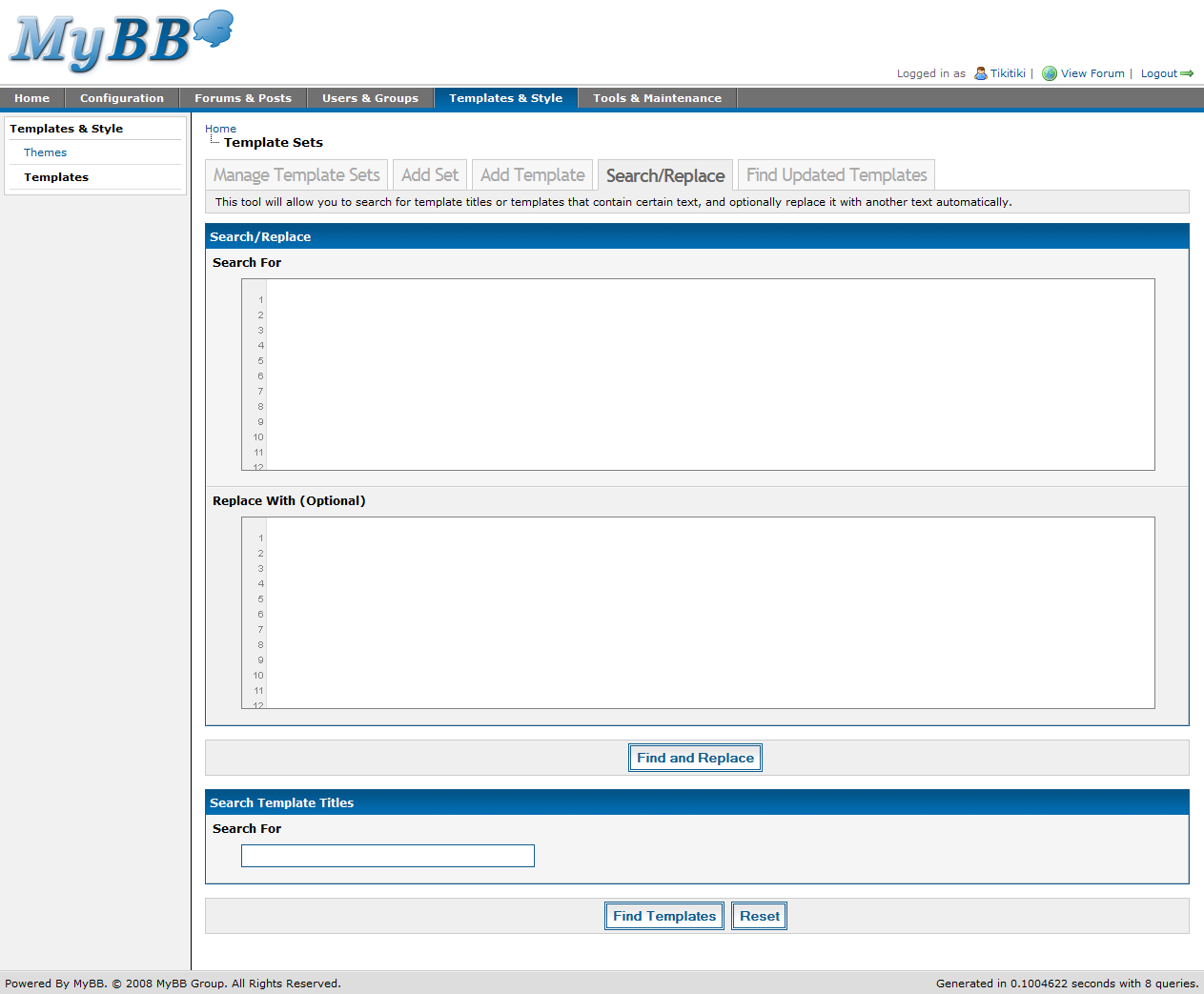
Template search and replace

Template search and replace has also seen the addition of Codepress. Also, you can now search and replace multiple lines of code at once – in 1.2, you could only provide a single line of code to search for and (if requested) replace.

Themes

Theming, on the other hand, has changed significantly since MyBB 1.2. 1.4 introduces a brand new theming system, including multiple stylesheets per theme, a new advanced editor, and an updated simple editor.

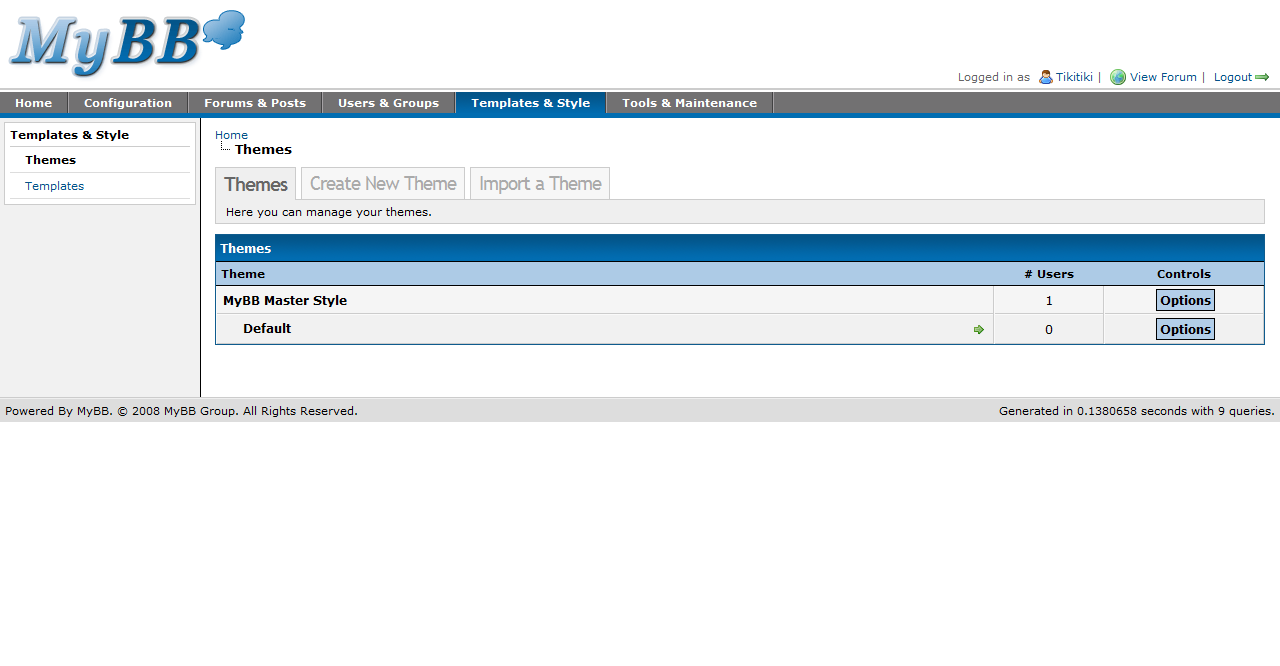
Themes listing
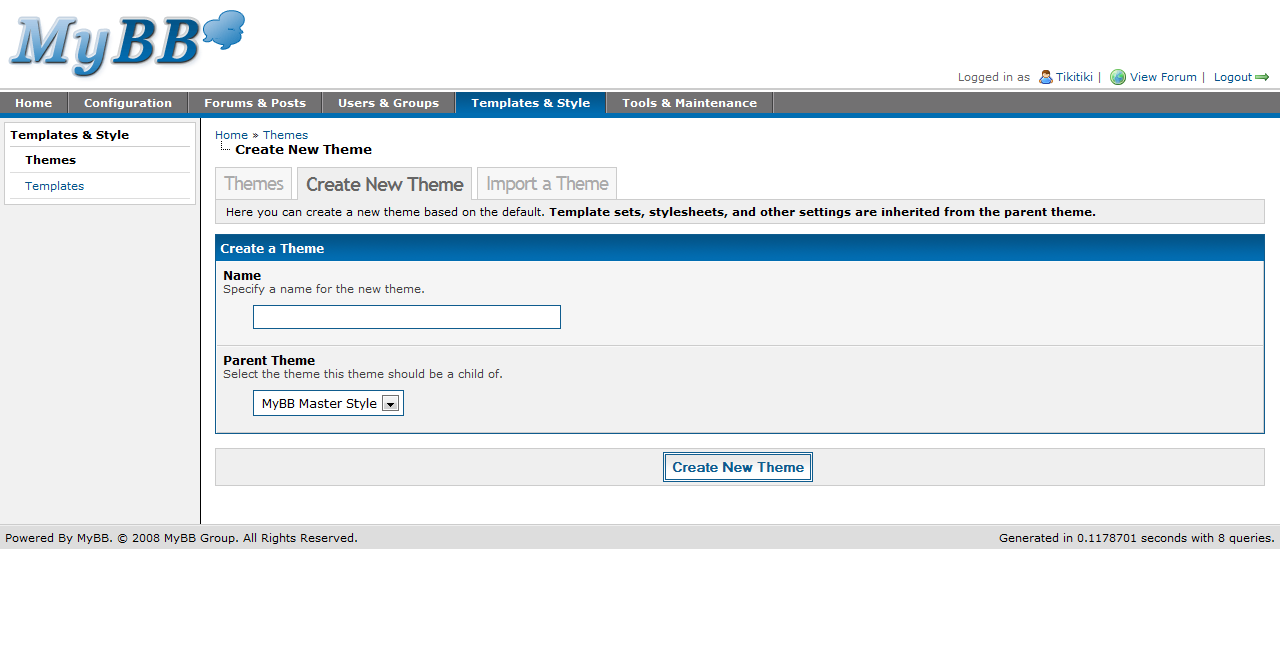
Create a theme

While the themes listing itself has not changed much, some features have. New to 1.4, you can force a theme on all users with the click of a button. Also, creating a theme is as simple as ever.

Edit theme

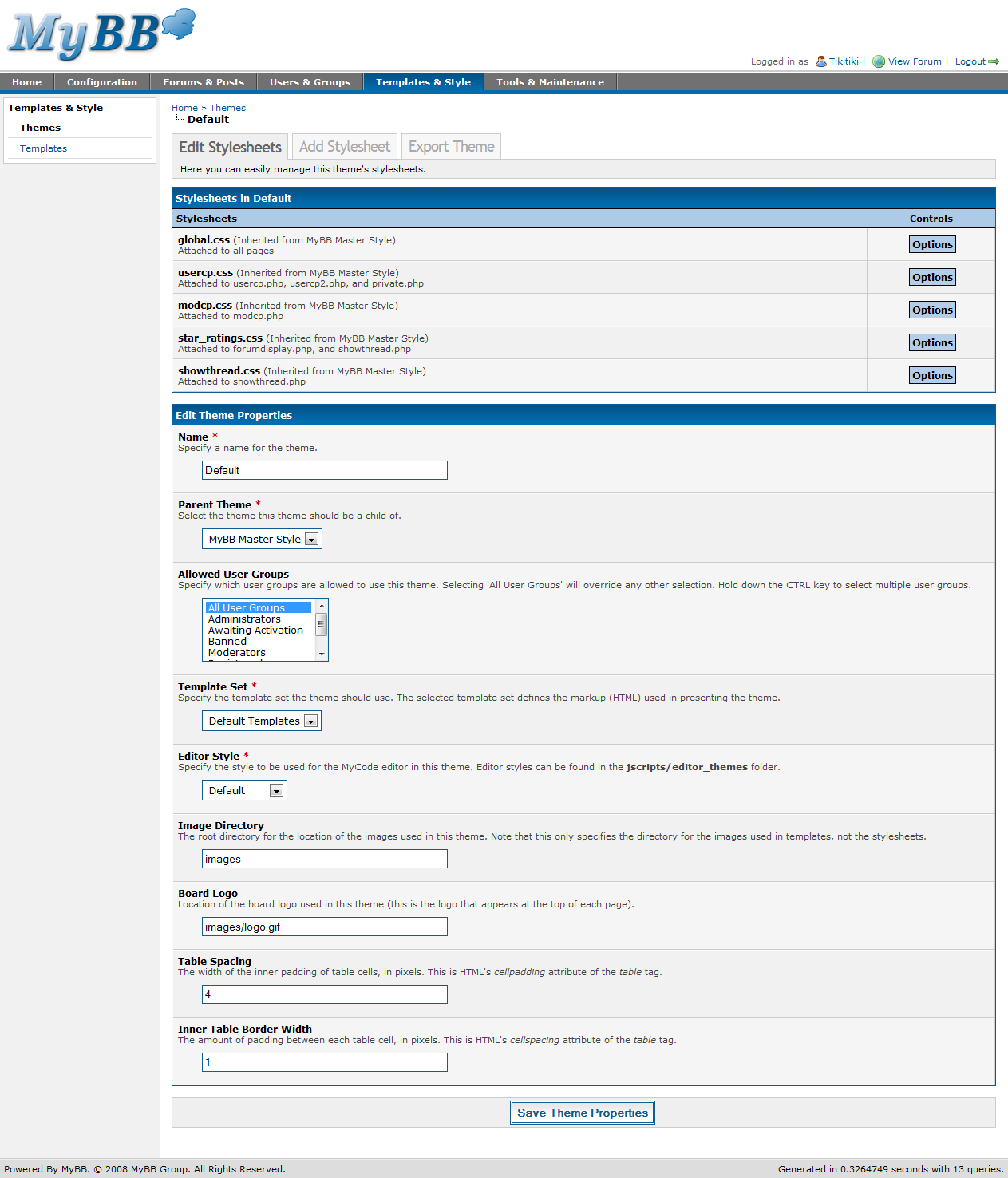
Right away, you’ll see some huge changes to this page. First, there’s a stylesheet listing. In 1.4, you can have multiple stylesheets per theme, with 5 included by default. Stylesheets can either be global (meaning it is used on all pages), or can be restricted to certain pages. If restricted to certain pages, you can also specify certain actions (if you wish) to use the stylesheet on. Stylesheets are inherited from parent themes until you edit them.

The rest of the page – the properties portion – is quite similar to 1.2. However, new to 1.4 is the “Editor Theme.” The MyCode Editor can now have multiple themes, as seen in the MyBB 1.4 Beta Screenshots post, which features both MyBB’s default editor theme and a special Office 2007 theme.

Simple mode
Advanced mode
Stylesheet properties

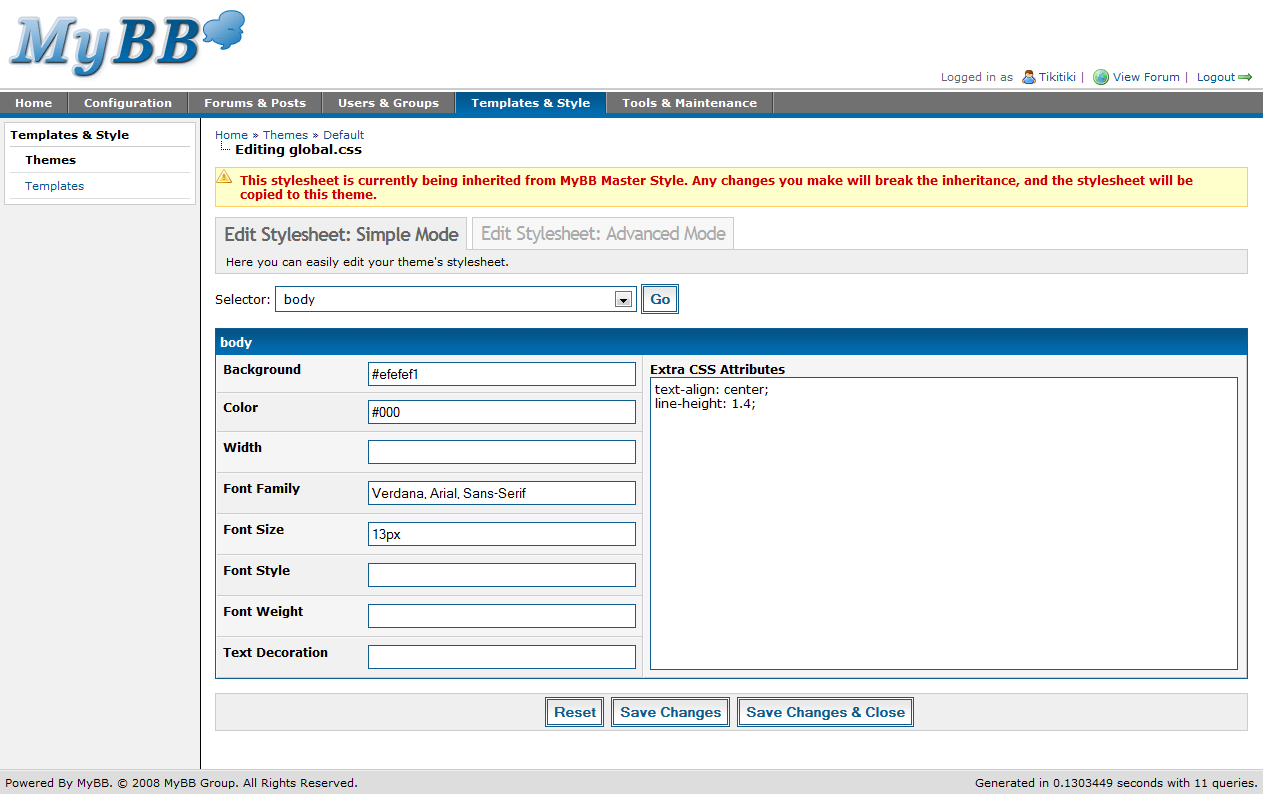
Stylesheets are the core of your theme, and in 1.4, there are two ways to edit them – simple and advanced modes. Simple mode is very similar to 1.2, in that it provides some of the common elements as separate text boxes, and then has an area to specify any additional CSS for each element. AJAX is used here for quick and simple switching between the various elements, and for saving elements.

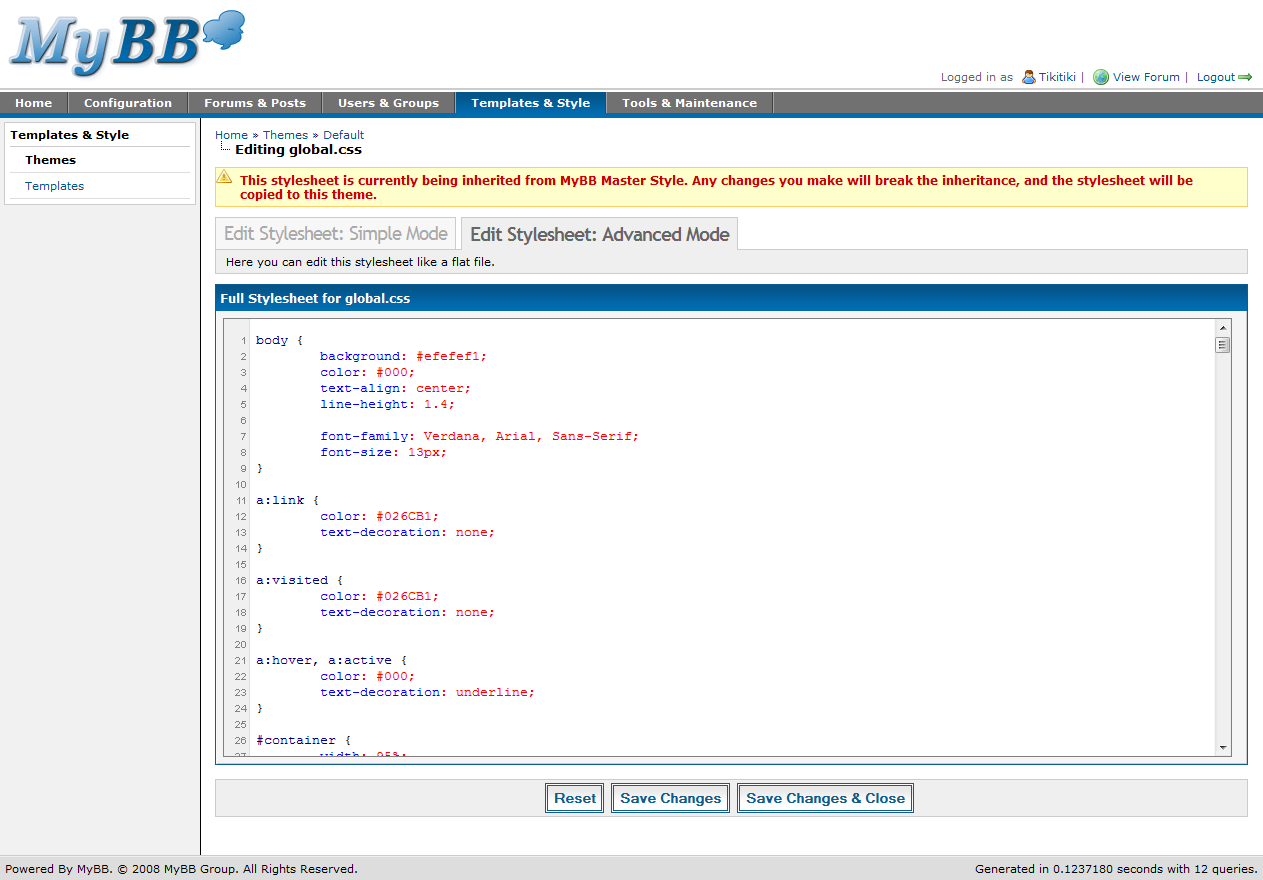
Advanced mode is new for MyBB 1.4, and allows advanced users a more familiar environment for CSS editing. Advanced mode shows the raw CSS and allows editing of it directly. Advanced mode must also be used if you wish to add additional elements to your stylesheets to further customize your theme beyond the default elements.

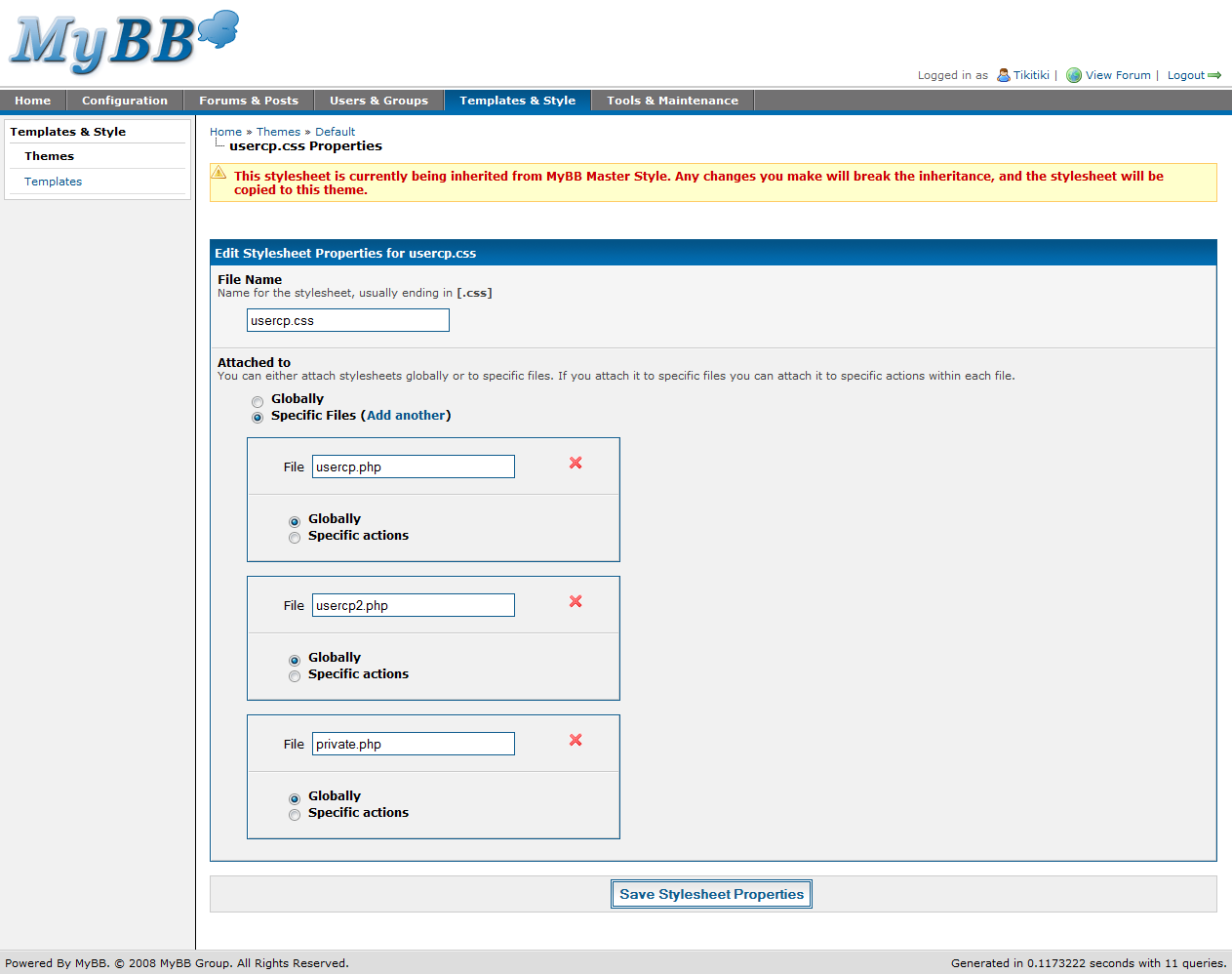
Finally, the stylesheet properties page allows you to edit the pages each stylesheet is loaded on. As you can see in the screenshot, you can specify multiple files that use each stylesheet. You can then select actions within each stylesheet, or have the stylesheet be loaded on all actions in the file. For instance, usercp.css is used on usercp.php, usercp2.php, and private.php, on all actions in each file.

Importing a theme
Exporting a theme

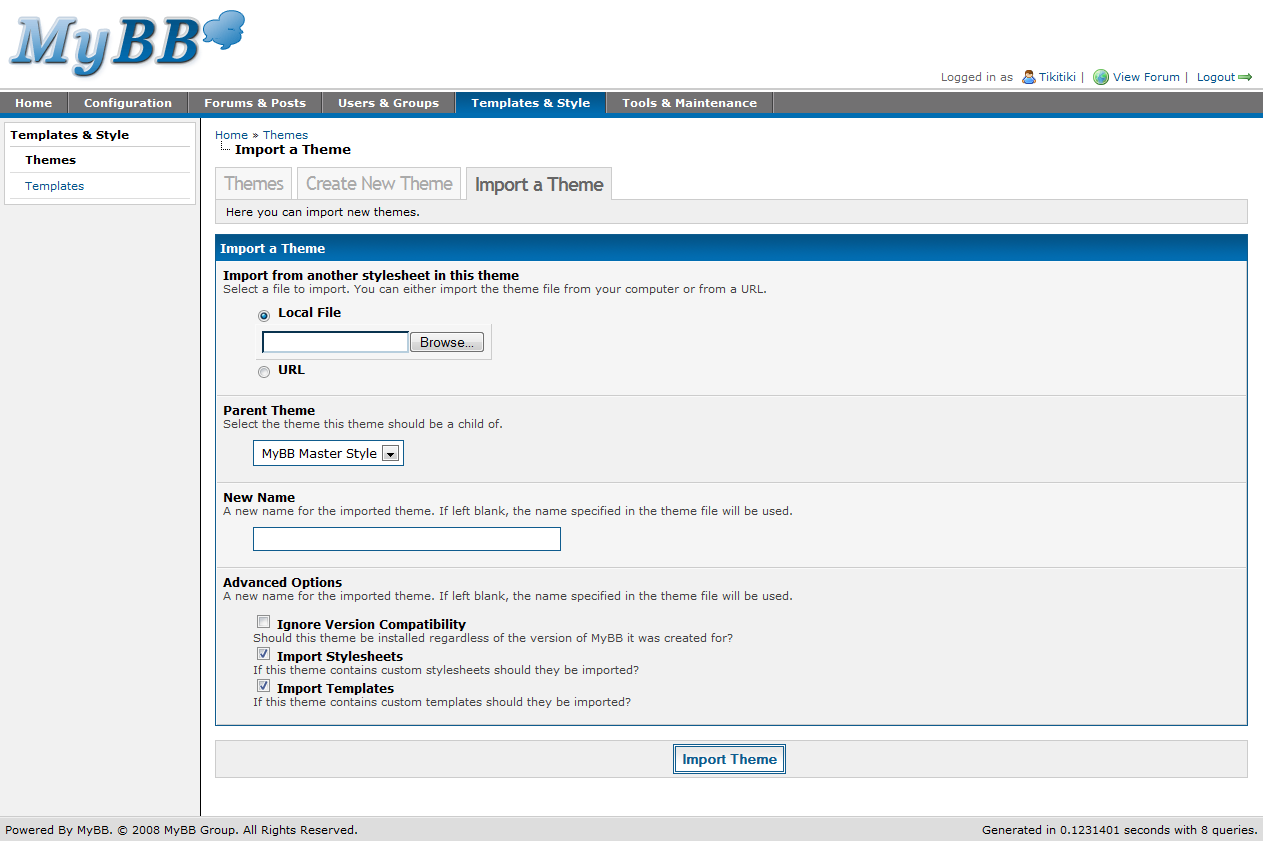
Importing a theme has seen a few helpful changes. First, you can now import from either a local file or from a URL. This means theme creators can simply post their XML files online rather than require users to upload it themselves.

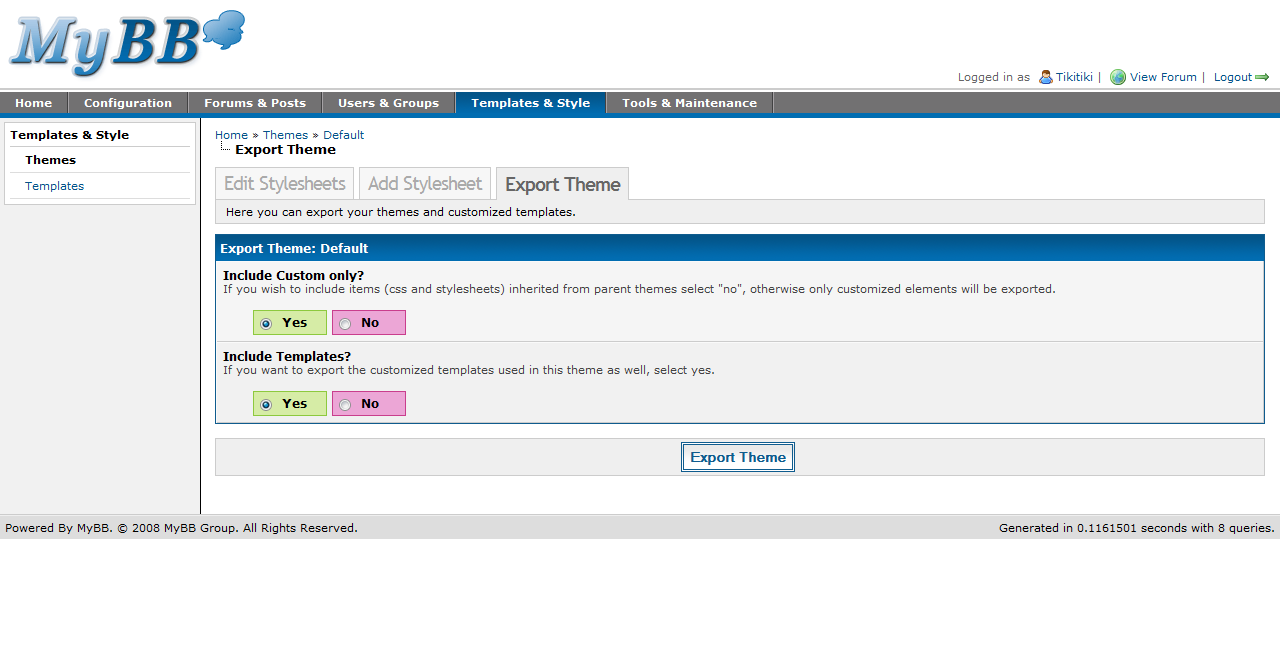
When exporting a theme, you are now presented with just two options – whether or not to include all or just the custom stylesheets, and whether or not to include the templates for the theme. This is pretty similar to 1.2, just changed slightly to fit the new theme system in 1.4.

There has been another important change in theming that doesn’t have a screenshot I can share. MyBB 1.2 added the ability to cache your themes to flat files, but in 1.4, we’ve taken it to the next level. You can now edit your stylesheets in a text editor and upload them to the directory created for each theme. When you go back into the ACP to edit the stylesheet at a later time, it will automatically take the content from the file and update the copy of the stylesheet in the database.

Questions

Thanks to the many of you who submitted their questions! We’ll start out with Snowy’s question which is probably the most asked question of MyBB 1.4:

Snowy Says:

When will MyBB 1.4 be released?

Now I know we have pretty much refused to give any dates in the past, but today, now that all the features are done and beta testing is well into progress, I am able to say with confidence that MyBB 1.4 should be released no later than July. Assuming no huge issues arise during beta testing, expect it to be here by then!

Das Tier Says:

well okay it says “you should put your read servers on a load balancer ” well show would you do that is that a server thing or some that can be done by MyBBoard.

Let me clarify for those of you whom didn’t read the technical section of last weeks post. Das Tier is asking about one way of setting up multiple MySQL servers on one MyBB installation for redundancy and performance reasons.

Das Tier, a load balancer is an application, or service, you can install on your server. It asks the MySQL servers for their loads (how stressed they are under) and it chooses the one with the least load. This in turn leads to a much faster and stable experience and in the event a MySQL server crashes, your other ones will still work.

Tip: Multiple MySQL servers however are costly and will probably only ever be used by forums with millions and millions of posts. So don’t go out thinking you need to buy multiple spaces at a Data Center in order for your forum to be fast. Most forums out there can operate fine on any standard or basic hosting package that meet MyBB’s minimum requirements.

Tristan Says:

Are there controls for administrators to regulate use of the moderator control panel (ie: how long mods can ban, who can edit profiles, etc…) or is the whole panel open season if one has access to it?

At this time, any user who has access to the Moderator CP has full access. Access to the Mod CP is set (similar to access to the Admin CP) as a user group setting.

robyhomes Says:
How will themes go on moving to this next version? I know the layout of the posting has changed a lot so will the theme have to be changed a long way to so that the user’s details are above the post? Or will the theme move it back to the side?

Your themes will be automatically converted to the new format. Templates will be reverted where possible, and any templates that were edited before the upgrade will have to be dealt with in the Find Updated Templates manager in the Admin CP.

Regarding the postbit layout: There’s a new setting in 1.4 that lets you decide whether you’d like a horizontal postbit (above the post) or classic postbit (to the left of the post). Users can also choose to use the classic postbit from their User CP.

Thanks for reading!

Thanks for reading our four-part series about the MyBB 1.4 Admin Control Panel. Hopefully the posts have been informative and have highlighted some of the great changes we’ve made to make your administration experience the best it can be. I personally cannot wait until 1.4 is released – and I hope you feel the same way.

Multiple people have contributed to this post, including: Tikitiki and Justin S.